---
title: Why your canonical tag might not be read at all
description: Attribute order, conflicting signals and self-reference. The canonical mistakes that quietly de-index pages.
url: https://moxseo.com/why-your-canonical-tag-might-not-be-read-at-all
date_modified: 2026-07-29
author: Ashish Khan
language: en_US
---
A canonical tag is one line of HTML that tells search engines which URL is the real one. It is also one of the easiest things to get subtly wrong in a way that produces no error, no warning, and no obvious symptom — just a page that never quite ranks.
## The tag is read as a hint, not an instruction
This is the first thing worth internalising. A canonical is a strong suggestion, not a directive. Google weighs it against other signals — internal links, sitemap entries, redirects, content similarity — and can disagree with you.
When those signals conflict, the canonical tends to lose. A page that canonicalises to itself while every internal link points elsewhere is sending two contradictory messages, and the links usually win.
## Attribute order breaks naive checkers
Both of these are valid HTML and identical in meaning:
- ``
- ``
Search engines parse both correctly. Plenty of audit tools do not — they pattern-match on `rel` appearing before `href` and report the second form as having no canonical at all.
We know because we shipped that bug ourselves and caught it in testing before release. It is worth knowing that a tool telling you a canonical is missing may be telling you about its own parser rather than your page.
The specific failure: our checker required `rel` to appear before `href` in the tag. Against a test page using the reverse order — entirely valid HTML — it reported “No canonical tag” on a page that had one. Anyone acting on that would have added a second canonical and created a genuine problem where none existed.
## The failure modes that actually cost you
Ordered roughly by how often we find them and how much damage each does.
- **Canonical pointing at the homepage from every page.** A template mistake that tells Google the entire site is one URL.
- **Canonical pointing at a redirected URL.** The target then redirects somewhere else, so the signal dissolves.
- **Canonical pointing at a noindexed page.** You are consolidating authority onto a page you have told Google to drop.
- **Two canonical tags on one page.** Usually a theme and a plugin both emitting one. Google will typically ignore both.
- **Relative canonical with a broken base.** Resolves to a URL that does not exist.
## What a correct canonical looks like
On an ordinary indexable page: one tag, absolute URL, pointing at itself, matching the URL in your sitemap and the one your internal links use. Same protocol, same subdomain, same trailing-slash convention.
Consistency across those signals matters more than the tag itself. Our [on-page audit tool](https://moxseo.com/tools/on-page-audit/) reports whether the canonical is self-referencing and shows the destination when it is not, so a mismatch is visible immediately.
## How Google chooses when signals disagree
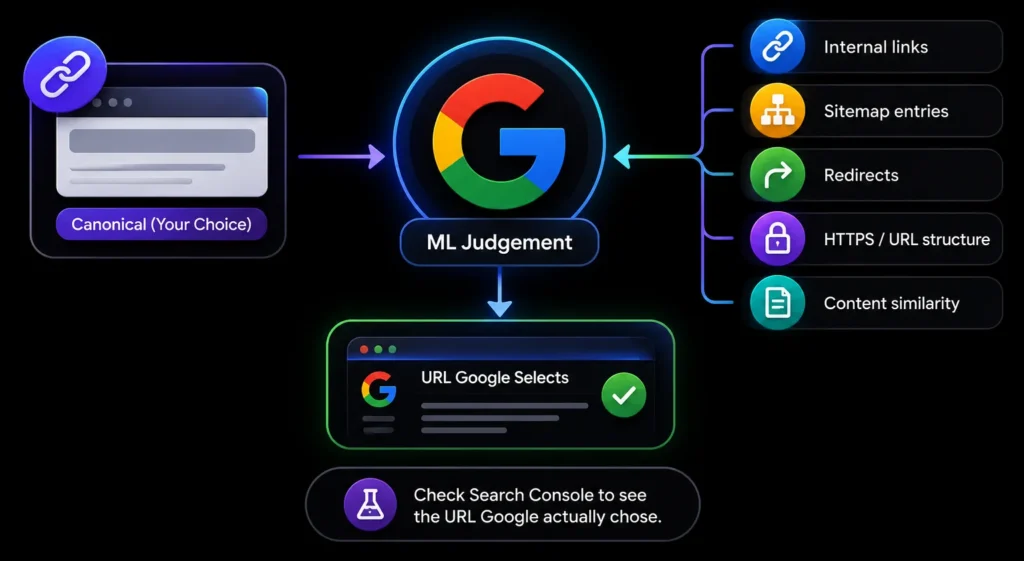Image Source: AI-generated visual by MoxSEO
Your canonical is one input among several. When they conflict, Google picks what it judges most likely to be correct, and the declared canonical does not automatically win.
- **Internal links** — which URL your own site links to most consistently
- **Sitemap entries** — which version you submitted
- **Redirects** — a redirect is a much stronger signal than a canonical
- **HTTPS and URL structure** — secure and cleaner URLs are preferred
- **Content similarity** — whether the pages really are duplicates
Search Console reports the URL Google actually selected under the Page Indexing report. When that differs from your declared canonical, the gap almost always names the conflicting signal.
## Parameters, pagination and the cases with no clean answer
Most canonical guidance covers the simple case. The awkward ones are where real sites live.
- **Tracking parameters.** A self-referencing canonical on the clean URL handles these well and is the main reason to have one at all.
- **Paginated series.** Each page should canonicalise to itself, not to page one. Canonicalising page three to page one tells Google the products on page three do not exist.
- **Faceted URLs.** Canonicalise to the unfiltered category, except for facets you deliberately want indexed.
- **Syndicated content.** A cross-domain canonical pointing at the original is the correct tool, and one of the few cases where pointing off-site is right.
## A five-minute check you can run today
Take your five most commercially important pages. For each one, confirm four things agree.
- The canonical points at the page itself, using an absolute URL
- That URL matches what your sitemap lists
- That URL matches what your internal links use, including trailing slash and protocol
- The page returns 200 rather than redirecting
If all four agree, the canonical is doing its job. If any disagree, that mismatch is a stronger signal than the tag, and it is what Google will act on.
Our [on-page audit](https://moxseo.com/tools/on-page-audit/) checks the first and fourth directly and shows the canonical destination when it is not self-referencing, which usually makes the mismatch obvious.
## Sources and further reading
- [How to specify a canonical URL with rel=”canonical”](https://developers.google.com/search/docs/crawling-indexing/consolidate-duplicate-urls)
- [The link element, HTML Living Standard](https://html.spec.whatwg.org/multipage/semantics.html#the-link-element)
## Make Every Canonical Signal Point to the Right URL
A canonical tag may look correct while conflicting internal links, redirects, sitemap entries, duplicate tags, parameter URLs, or noindexed targets quietly weaken it. Contact MoxSEO for a canonical and indexability audit that checks how your declared URLs align with the signals search engines actually use. We will identify incorrect canonical destinations, redirected targets, duplicate implementations, pagination mistakes, faceted-navigation conflicts, and URL inconsistencies that may be preventing important pages from ranking as intended.
[Schedule a consultation with MoxSEO](https://moxseo.com/schedule-consultation/) to review your highest-value pages and create a clear canonicalisation plan for your website. Our team will help you align canonicals, internal links, redirects, sitemaps, protocols, subdomains, and trailing-slash rules so every signal consistently supports the URL you want search engines to index.
## Frequently asked questions
### Should every page have a canonical tag?
Every indexable page should carry a self-referencing one. It costs nothing and removes ambiguity when URLs pick up tracking parameters.
### Can a canonical point to a different domain?
Yes, cross-domain canonicals are supported and are the correct tool for syndicated content. They are also easy to misconfigure, so use them deliberately.
### Does a canonical stop a page being crawled?
No. The page is still crawled. The canonical only affects which URL is indexed and consolidated.
### What if Google ignores my canonical?
Check what else is pointing elsewhere. Search Console reports the URL Google actually selected, and the gap between that and your declared canonical usually names the conflicting signal.