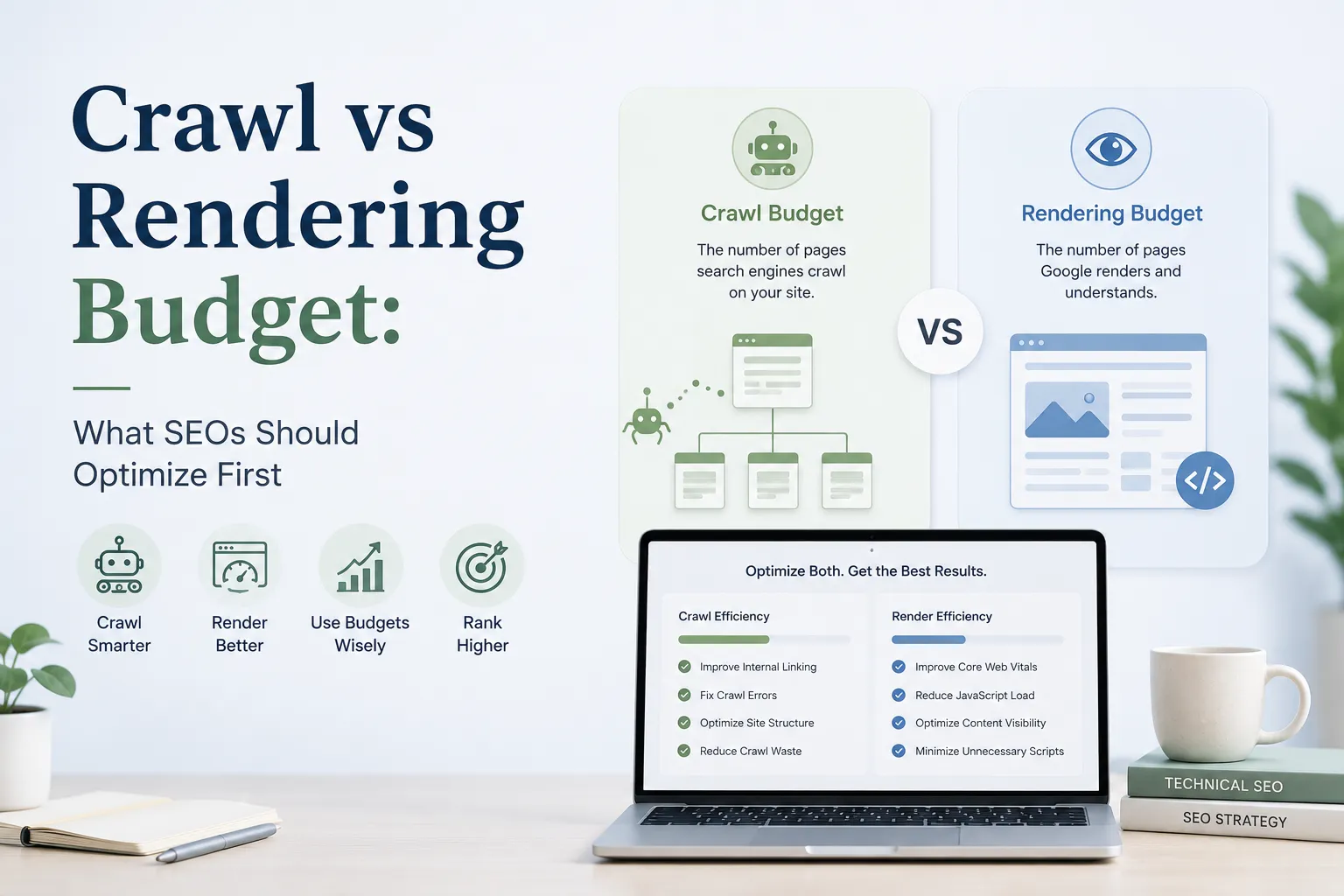
Search engines don’t browse your website like a human scrolling from page to page. They work with limited resources and make constant trade-offs about what to fetch, how often to return, and how much effort to spend processing each page. That’s where Crawl vs Rendering Budget come in. Crawl budget determines how efficiently bots can discover and recrawl your URLs, while rendering budget decides how reliably JavaScript-dependent pages are fully processed so content and links can be understood. When rankings drop or indexing slows, teams often assume the problem is “Google not crawling enough” or “JavaScript is fine now,” and they end up fixing the wrong layer.
This guide provides a clear, SEO-first framework to identify the real bottleneck and prioritize the right work first. You’ll learn how to spot crawl waste, diagnose rendering dependency, and choose actions that improve indexation speed and consistency. It also includes practical checklists you can apply immediately.
What crawl budget and rendering budget really mean
Crawl budget
Crawl budget is the practical limit of how many URLs a search engine will request from your site in a given period. It’s shaped by:
- Crawl rate limit: how fast a bot thinks it can crawl without harming your server (performance, errors, timeouts).
- Crawl demand: how much the bot wants to crawl based on importance, freshness, uniqueness, and popularity.
If crawl budget is misallocated, bots spend time on low-value URLs and revisit important pages too slowly.
Rendering budget
Rendering budget is the practical limit of how much compute a search engine will spend executing JavaScript to produce the rendered DOM and extract content/links. Rendering is heavier than crawling, so it can be delayed or deprioritized.
If rendering budget is the bottleneck, bots may fetch your URLs but still fail to index critical content because it appears only after JS runs.
The key difference in one sentence
- Crawl budget controls discovery and recrawling.
- Rendering budget controls whether JS-dependent content and links are actually understood and indexed.
That’s why some sites show “crawled” pages but weak indexing: crawling happened, rendering didn’t (or didn’t happen reliably).
Signs you should optimize crawl budget first
1) You have URL explosion or index bloat
Typical causes:
- faceted navigation and filters generating endless combinations
- internal search pages being crawlable
- tracking parameters creating duplicates
- multiple URL versions of the same content (sort, pagination, session IDs)
Symptoms:
- lots of “discovered” URLs, but key pages take too long to get crawled
- crawl activity concentrated on parameter URLs
- many near-duplicate URLs competing with your canonical pages
2) Bots waste time on redirects, errors, and slow pages
Symptoms:
- frequent 5xx errors or timeouts
- long server response times (TTFB)
- redirect chains and loops
- old URLs still linked internally
When servers are unstable or slow, crawlers back off.
3) Your internal linking doesn’t show priorities
Symptoms:
- important pages are deep in the click path
- orphan pages exist (no internal links)
- navigation relies on JS interactions
- weak hierarchy and inconsistent breadcrumbs
Internal links guide crawlers. If you don’t guide, crawl gets scattered.
Signs You Should Optimize Rendering Budget First
Rendering budget becomes the priority when search engines can fetch your URLs, but can’t reliably process what the page actually contains. The result is often delayed indexing, thin indexed content, or inconsistent visibility across templates.
1) Your content is missing from the HTML source
A quick way to spot a rendering dependency is to check what the server returns before JavaScript runs. Right-click on a page and open “View page source.” If the main content isn’t there, the page likely depends on JS to generate it.
When this happens, pages can still be crawled, but they often index as thin, partial, or incomplete. You’ll notice that titles, headings, product details, or key text only appear after scripts load, and sometimes the real content arrives only after additional API calls complete. That increases the chance of delays or inconsistent indexing because the crawler must render the page to “see” anything meaningful.
2) Internal links are not present as real anchors
Rendering problems aren’t only about text content. They also affect discovery. If important links are created through JavaScript routing, click handlers, or UI states, crawlers may not extract them consistently. This is especially common in SPAs where navigation relies on events rather than standard links.
Typical symptoms include category, product, or article pages staying undiscovered longer than expected, and link extraction behaving differently across templates. In short, the crawler can’t reliably map your site structure because the links are not clearly available in the page markup.
3) Metadata is injected late or behaves inconsistently
Another strong signal is when key SEO directives are added only after JavaScript executes. If canonicals, meta robots tags, hreflang, or structured data are injected late, search engines may process inconsistent signals depending on when and how the page is rendered.
You may also see differences in output based on personalization, geolocation, cookie banners, or consent tools. When indexing signals depend on runtime execution, SEO becomes fragile because crawlers may not always see the same version of the page.
What to do first if crawl budget is the bottleneck
When crawl budget is the issue, your job is to reduce crawl waste so bots spend their requests on pages you actually want indexed.
1) Stop generating low-value crawlable URLs
This is usually the fastest win. Identify URL patterns that create endless or low-value pages, then cut them off at the source.
- Remove internal links to internal search pages and weak filter states
- Limit crawlable facets (only allow combinations that have real search demand)
- Prevent “infinite spaces” like calendars, endless paging, or auto-generated archives
- Keep XML sitemaps clean: only include pages you truly want indexed
2) Fix canonicalization and duplication
Even after you reduce URL explosion, duplicates can keep wasting crawl resources if consolidation signals are messy.
- Canonicals should point to a 200 OK page
- Keep canonicals consistent across duplicates
- Avoid canonical chains (A → B → C)
- Handle pagination intentionally (don’t automatically canonical everything to page 1 unless that’s your plan)
3) Remove redirect and error waste
Redirect chains and errors consume crawl requests without adding value.
- Eliminate redirect chains and loops
- Update internal links to point directly to the final URL
- Reduce internally-linked 404s from old or broken paths
- Fix 5xx and timeout spikes to avoid crawler slowdowns
4) Improve server performance and stability
A faster, more reliable site often earns a healthier crawl rate over time. Focus on server response time, caching for stable templates, and preventing infrastructure issues during crawl spikes.
5) Align sitemaps with what you want indexed
Use sitemaps as a priority signal, not a dump. Segment by type (products, categories, articles) and monitor indexation per segment to spot where crawling is still being wasted or deprioritized
What to do first if rendering budget is the bottleneck
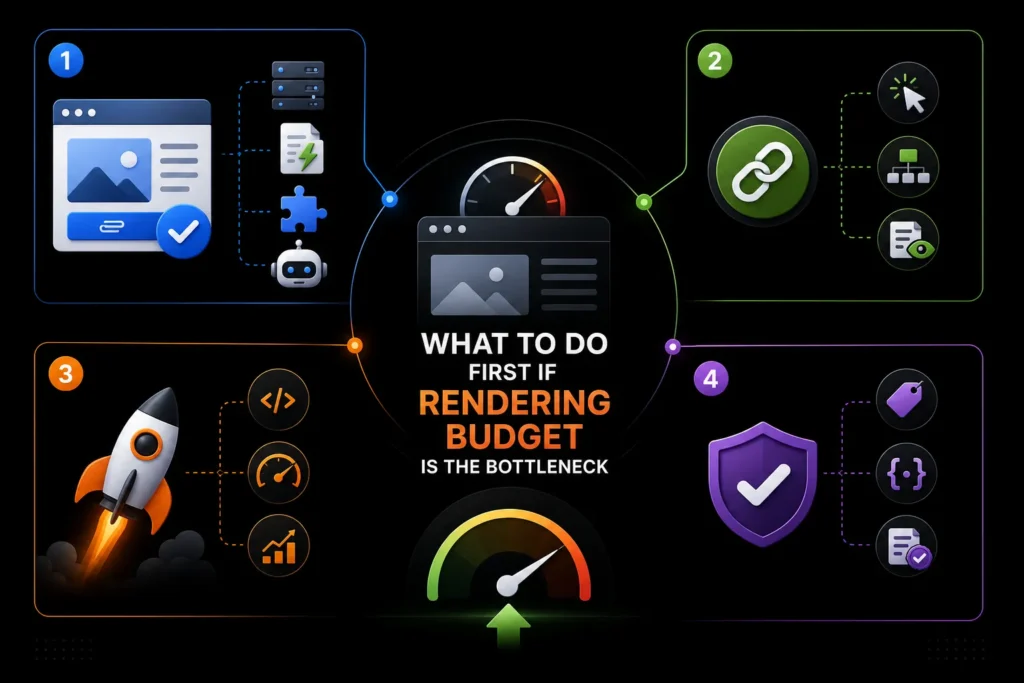
1) Ensure critical content is available without JS dependency
Options (choose based on stack):
- server-side rendering (SSR) for critical templates
- static generation for marketing/content pages
- hybrid rendering (SSR for high-value routes only)
- reliable pre-rendering for bot-visible pages
Goal: make the main content and primary links visible immediately.
2) Make internal links crawlable by default
Checklist:
- use <a href=”…”> for internal links
- do not hide key links behind click events
- ensure pagination and category paths exist without interaction
- avoid building discoverability on scroll-only events
3) Reduce JS cost so rendering is more reliable
Checklist:
- cut unused JS, reduce bundle size
- remove heavy third-party scripts
- reduce long tasks and render-blocking patterns
- ensure critical API calls return quickly (or render fallback content)
4) Stabilize SEO signals (metadata + structured data)
Checklist:
- titles, canonicals, robots meta should be correct early
- structured data present and matches visible content
- avoid conditional canonicals based on client-side states
The “optimize first” cheat sheet
Use this quick guide to decide where to focus first. It’s built around the most common real-world patterns SEOs see in crawl stats, logs, and indexing behavior.
Optimize crawl budget first when
Crawlers are spending time in the wrong places, or they can’t crawl enough of what matters.
- You have lots of duplicate URLs and parameter variations (filters, sort, UTM, pagination combos)
- Bots crawl junk paths more than key pages (facets, internal search, thin tag pages)
- Your site is large or creates too many URL combinations even at medium scale
- Server instability or slowness reduces crawl rate (timeouts, 5xx spikes, slow TTFB, weak caching)
What you’ll usually see: important pages are discovered late, refreshed slowly, or crawl activity is heavily wasted on low-value URLs.
Optimize rendering budget first when
Crawling is happening, but the search engine can’t reliably “see” or process what users see.
- Key content is missing from view-source HTML (the HTML is mostly a shell)
- Navigation and internal links depend on JavaScript interactions (click/scroll/state-based links)
- Indexing is delayed or inconsistent on JS-heavy templates (thin indexed content, slow indexing cycles)
- Metadata or structured data is injected late by JavaScript (canonicals, titles, robots, JSON-LD not stable early)
What you’ll usually see: pages are crawled, but indexed results look thin, incomplete, or take too long to reflect updates.
Common Traps and How to Avoid Them
One reason technical SEO work fails is that teams fix what sounds important, not what’s actually limiting growth. These are the traps that waste the most time, and the simple shifts that prevent them.
Trap 1: Treating crawl budget like a problem every site has
Many small and mid-sized sites don’t hit real crawl limits. When indexing is poor, it’s usually caused by issues that look similar but have different fixes: duplicate URLs, weak internal linking, thin or repetitive content, messy canonical signals, or pages that depend entirely on JavaScript to show meaningful content. Instead of chasing “crawl budget,” focus on cleaning duplication, strengthening internal structure, and making key pages clearly indexable.
Trap 2: Believing “Google renders JavaScript” means you’re safe
Rendering is not guaranteed to be fast or consistent. If your important content and internal links only appear after JS runs, indexing can become delayed, incomplete, or unstable. Make critical content accessible early and keep discoverability strong with standard crawlable links.
Trap 3: Blocking URLs instead of solving the real leak
Robots rules may hide problems, but they rarely fix them. The durable approach is to stop generating crawlable junk, remove internal links that feed those URLs, and consolidate duplicates with clean canonicalization. This is how you actually reclaim crawl efficiency.
Where MoxSEO Fits in Solving Crawl vs Rendering Budget Problems at Scale
Choosing between crawl budget and rendering budget is easier when you treat it as a template-level system, not a one-time audit. That’s where MoxSEO fits.
If you want a reliable framework for diagnosing and fixing crawl versus rendering constraints at the template level, the focus should be on technical SEO systems that deliver measurable outcomes:
- reducing crawl waste so bots spend time on the right URLs
- improving indexation speed for new and updated pages
- making JavaScript-based sites indexable without fragile workarounds
For teams that need ongoing measurement and engineering-ready recommendations, these steps can be packaged into a repeatable workflow, so improvements stick even as the site scales and templates evolve.
Conclusion
In the end, the right starting point depends on what is actually blocking performance. Optimize crawl budget first when bots are wasting requests on duplicates, parameters, redirects, or other low-value URL patterns, and your most important pages are being discovered or refreshed too slowly. In these cases, the fastest path to better indexation is reducing crawl waste and guiding crawlers toward clean, canonical URLs that matter for rankings.
Optimize rendering budget first when your key pages are being crawled but the indexed result is thin, incomplete, or slow to appear because content and internal links rely on JavaScript. If search engines can’t consistently render what users see, indexing becomes delayed and unpredictable. Want a clear, step-by-step plan tailored to your site templates? Get in touch today to request a technical SEO review and a prioritized action roadmap.
FAQs
What’s the difference between crawl budget and rendering budget?
Crawl budget is how many URLs search engines fetch from your site. Rendering budget is how much effort they spend executing JavaScript to see full content and links.
Which should I optimize first?
Start with crawl budget if discovery is the issue (wasted crawling, duplicates, parameters, errors). Start with rendering budget if pages are crawled but content or links depend on JavaScript and indexing is delayed or incomplete.
Do small sites need crawl budget optimization?
Usually not. Most small-site indexing issues come from duplication, weak internal linking, thin pages, or confusing canonicals, not limited crawling.
How do I know I have a rendering problem?
If “view page source” is missing your main content or key links, and they appear only after JS runs, rendering is likely hurting indexing reliability.
Does Google always render JavaScript?
It can render many pages, but rendering is resource-heavy and may be delayed or inconsistent at scale. Relying on JS for critical content increases risk.
Can rendering affect internal link discovery?
Yes. If navigation, pagination, or category links are created late by JS or require interaction, crawlers may not discover your deeper pages consistently.
Is server-side rendering required for SEO?
Not always. It becomes important when core content, links, or SEO signals aren’t present in initial HTML or indexing is unstable.
What causes crawl waste most often?
Faceted filters, parameter URLs, internal search pages, tracking tags, redirect chains, broken links, and inconsistent canonicalization.
Does robots.txt blocking improve crawl budget?
Sometimes it reduces fetching, but it doesn’t fix root causes like endless URL generation or internal linking to junk URLs. Control URL creation and consolidate duplicates first.
What’s the quickest win?
For crawl: reduce duplicate/parameter URL spaces and clean up redirects/errors. For rendering: make critical content and links available without heavy JS dependency.

Sakshi Kumari is an SEO Specialist at MoxSEO with expertise in keyword research, on-page SEO, content optimization, technical SEO, and link-building strategies. She focuses on improving organic visibility, strengthening website performance, and creating search-focused content that attracts relevant traffic. Through data-driven analysis and practical SEO execution, Sakshi helps businesses build stronger search presence and achieve sustainable digital growth.