



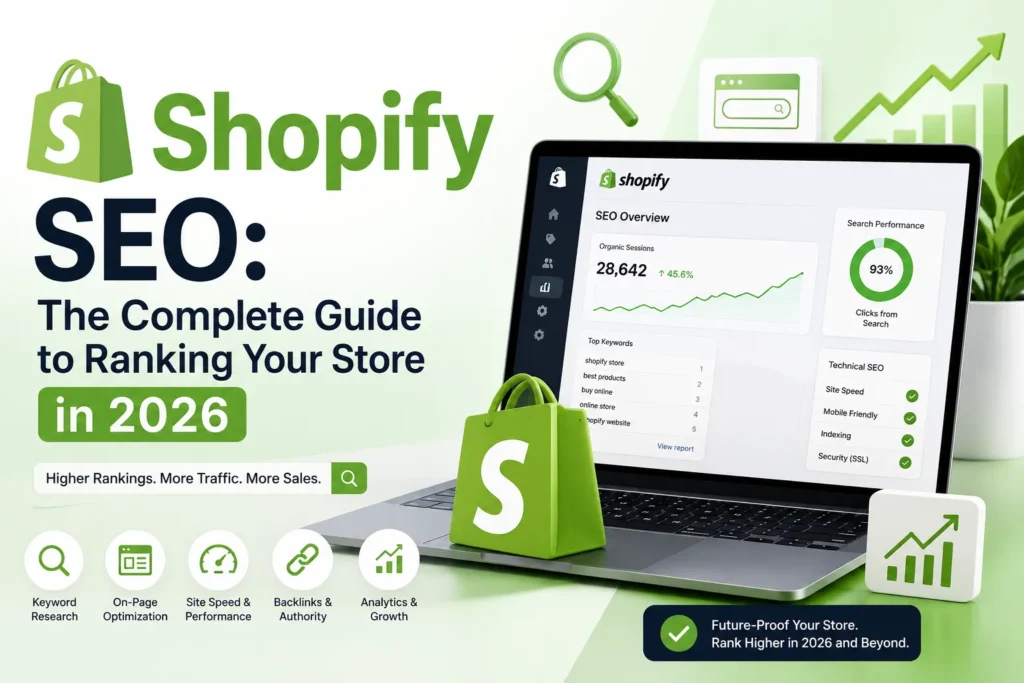
Shopify makes it easy to launch an ecommerce store, but built-in features alone do not guarantee strong Google rankings.
A store can still struggle because of duplicate URLs, weak collection pages, copied product descriptions, slow themes, excessive apps, poor internal linking, and unclear keyword targeting.
A successful Shopify SEO strategy should help search engines understand the store while helping customers discover, compare, and purchase the right products.
This guide explains the most important Shopify SEO improvements for increasing organic visibility, qualified traffic, and ecommerce revenue in 2026.
Why Shopify SEO Requires a Platform-Specific Strategy
Shopify provides secure hosting, canonical tags, XML sitemaps, mobile-friendly themes, and editable metadata. However, its ecommerce structure creates SEO challenges that require careful management.
Common Shopify SEO issues include:
- Products appearing through multiple URL paths
- Filtered collection URLs creating duplicate pages
- Thin product and collection content
- Heavy themes and unnecessary app scripts
- Product variants creating overlapping signals
- Weak links between blogs, collections, and products
- Duplicate structured data from themes and apps
These issues do not prevent Shopify stores from ranking. They simply require a strategy built around Shopify’s technical structure.
Start With a Shopify SEO Audit
Before changing titles, installing apps, or publishing new articles, review how the store currently performs.
A Shopify SEO audit should identify:
- Which pages Google can crawl and index
- Which products and collections receive organic traffic
- Which pages compete for the same keyword
- Whether filtered URLs are being indexed
- Whether structured data contains errors
- Which templates have poor Core Web Vitals
- Which organic landing pages generate sales
Use Google Search Console, Google Analytics 4, Shopify Analytics, Google Merchant Center, and a technical crawling tool.
The audit should connect SEO visibility with business performance, including product views, add-to-cart events, completed purchases, and organic revenue.
Find the Right Keywords for Every Shopify Page
Keyword research should decide which search intent belongs to each page.
Product pages, collection pages, and blog articles should not target the same keywords.
| Keyword type | Example | Best page |
|---|---|---|
| Product keyword | Black leather laptop backpack | Product page |
| Collection keyword | Men’s running shoes | Collection page |
| Comparison keyword | Trail shoes vs road shoes | Blog or buying guide |
| Informational keyword | How to choose running shoes | Blog article |
| Branded keyword | Brand name running shoes | Homepage or brand page |
Target Specific Keywords With Product Pages
Product pages should focus on detailed searches that describe an individual item.
These keywords may include:
- Product type
- Brand
- Model
- Colour
- Size
- Material
- Capacity
- Compatibility
- Key feature
For example, a product page can target “black waterproof leather laptop backpack” rather than the broader keyword “laptop bags.”
Use Collection Pages for Broader Commercial Searches
Collection pages should target customers who want to compare several products.
Examples include:
- Men’s trail running shoes
- Ergonomic office chairs
- Natural skincare products
- Handmade ceramic mugs
These pages often have stronger revenue potential because they match category-level purchase intent.
Use Blog Content for Research-Based Searches
Blog articles should answer questions customers ask before purchasing.
Useful topics include:
- How to choose an ergonomic office chair
- Running shoes vs training shoes
- How to clean a leather backpack
- What suitcase size do I need?
Every article should naturally link to relevant products or collections.
Fix Duplicate Product URLs and Indexing Issues
A Shopify product may be accessible through more than one URL.
For example:
yourstore.com/products/product-name
yourstore.com/collections/category/products/product-name
Shopify usually adds a canonical tag that points to the preferred product URL. However, stores should still link consistently to the canonical version.
Review product links from:
- Navigation menus
- Collection cards
- Homepage sections
- Blog articles
- Related-product sections
- Breadcrumbs
Use the Correct SEO Control
Canonical tags, redirects, noindex directives, and robots.txt rules perform different functions.
| SEO control | Main purpose |
| Canonical tag | Identifies the preferred version of similar pages |
| 301 redirect | Sends users and crawlers to a replacement URL |
| Noindex directive | Requests exclusion from search results |
| Robots.txt rule | Controls crawler access |
Do not use robots.txt as a replacement for canonical tags or redirects.
Shopify stores can customize the robots.txt.liquid file, but incorrect changes can block important pages and reduce organic visibility.
Control Filtered Collection URLs
Shopify filters help customers browse by size, colour, price, brand, material, and availability.
However, every filter combination does not need to appear in Google.
A filtered page may deserve indexation when it has:
- Clear search demand
- A stable product selection
- Enough matching products
- Unique commercial value
- Relevant internal links
For example, “black leather office chairs” may deserve a dedicated collection page if customers search for it consistently.
Low-value combinations with one temporary product should generally not become independent organic landing pages.
For important filter combinations, create a dedicated collection page with a unique title, description, URL, metadata, and product selection.
Optimize Shopify Product Pages for Search and Sales
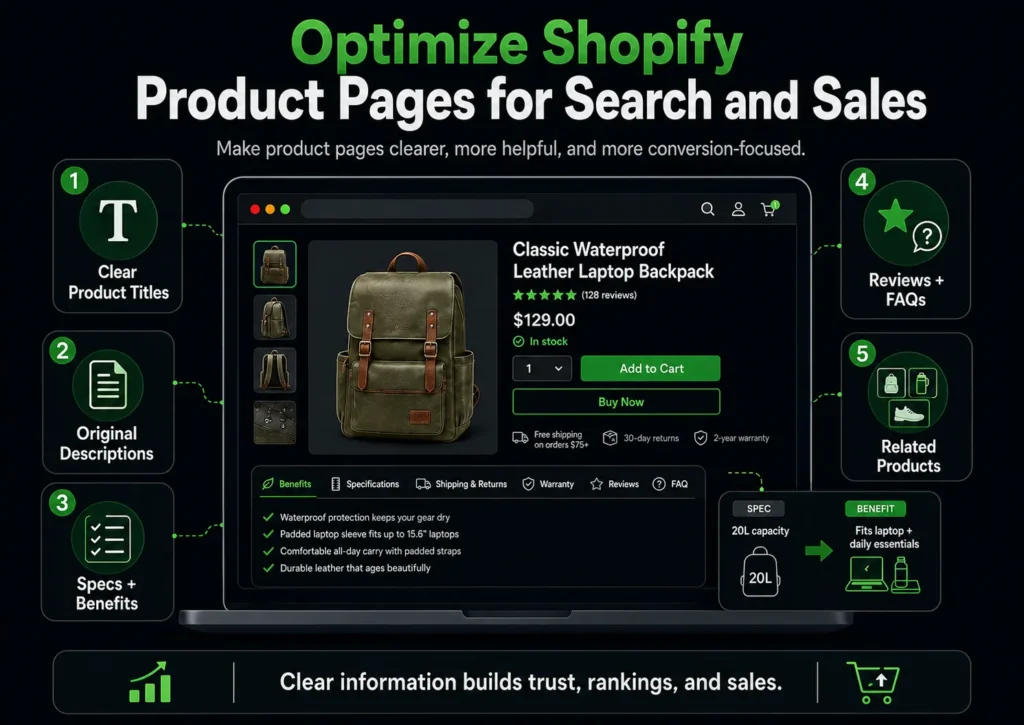
Image Source: AI-generated visual by MoxSEO
Product pages should explain the item clearly, answer purchase questions, and help customers make confident decisions.
Write Clear and Descriptive Product Titles
Avoid vague titles such as:
Classic Model 02
Use a title that explains the actual product:
Classic Waterproof Leather Laptop Backpack
Keep the main product term near the beginning and avoid filling the title with unnecessary keywords.
Replace Copied Manufacturer Descriptions
Manufacturer descriptions are often repeated across several retailers.
Original product descriptions should explain:
- What the product is
- Who it is for
- Its main benefits
- Important specifications
- Materials or ingredients
- Size or compatibility
- Usage and care instructions
- Shipping and returns
- Warranty details
There is no fixed word count. The description should be long enough to answer real customer questions without adding filler.
Turn Specifications Into Benefits
Specifications explain what a product includes. Benefits explain why those details matter.
For example:
Specification: 20-litre capacity
Benefit: Holds a laptop, charger, bottle, and daily essentials without feeling bulky.
Use both so the page remains informative and persuasive.
Add Reviews, FAQs, and Related Products
Product-specific FAQs can address questions such as:
- Which size should I choose?
- Is the product suitable for outdoor use?
- What is included in the package?
- Is it compatible with my device?
- How should it be cleaned?
Genuine reviews and relevant product recommendations can also improve trust, product discovery, and internal linking.
Improve Shopify Collection Pages for Commercial Keywords
Collection pages are among the most valuable SEO assets in a Shopify store.
They can rank for broader commercial searches and help customers compare multiple products.
Use Descriptive Collection Names
Avoid generic names such as:
- Collection 1
- Featured
- Latest products
- Our favourites
Use names that describe the category clearly:
- Men’s Trail Running Shoes
- Ergonomic Office Chairs
- Natural Skincare for Sensitive Skin
- Handmade Ceramic Coffee Mugs
Add Helpful Content Around the Product Grid
A short introduction above the product grid should explain:
- What the collection includes
- Who it is designed for
- Which features matter
- How customers can compare options
Additional buying guidance, FAQs, or material information can appear below the grid.
The purpose is to support purchase decisions without pushing products too far down the page.
Improve Collection Metadata and Internal Links
Every important collection should have:
- A unique title tag
- A useful meta description
- A descriptive URL
- Links from the homepage or main navigation
- Contextual links from blog articles
- Links to relevant subcollections
Priority collections should not depend only on filters for discovery.
Optimize Product Images for Search and Speed
Product images influence rankings, page speed, accessibility, and conversion confidence.
Use descriptive filenames such as:
black-waterproof-laptop-backpack-front.jpg
Write alt text that accurately explains the image:
Black waterproof laptop backpack shown from the front with two zipped compartments
Also:
- Upload images close to their display size
- Compress without visible quality loss
- Use efficient image formats
- Lazy-load below-the-fold images
- Avoid lazy-loading the main product image
- Add width and height attributes
- Use unique alt text for different product angles
Avoid repeating the same keyword across every image.
Validate Product Schema and Merchant Data
Product structured data helps search engines understand information such as:
- Product name
- Brand
- Price
- Currency
- Availability
- SKU
- Reviews
- Ratings
- Shipping
- Returns
- Variants
Many Shopify themes already include basic product schema. Additional review or SEO apps may add more markup.
This can create duplicate Product objects, conflicting prices, inaccurate availability, or repeated ratings.
Test important product templates using Google’s Rich Results Test and monitor merchant listing reports in Search Console.
Structured data can improve eligibility for enhanced search results, but it does not guarantee that rich results will appear.
Improve Shopify Speed and Core Web Vitals
Store speed affects customer experience and conversion performance.
The main Core Web Vitals benchmarks are:
| Metric | Recommended target |
| Largest Contentful Paint | 2.5 seconds or less |
| Interaction to Next Paint | 200 milliseconds or less |
| Cumulative Layout Shift | 0.1 or less |
Remove Unnecessary Apps and Scripts
Review apps that add:
- Chat widgets
- Pop-ups
- Heatmaps
- Review tools
- Social feeds
- Upselling features
- Personalization tools
- Advertising pixels
Remove or delay anything that does not provide clear business value.
After uninstalling an app, check whether it has left scripts or theme code behind.
Optimize Important Shopify Templates
Do not test only the homepage.
Review performance across:
- Product pages
- Collection pages
- Blog articles
- Cart pages
- Important landing pages
Large banners, sliders, product images, review widgets, and dynamic payment buttons are common causes of slow loading or layout shifts.
Build a Clear Shopify Store Structure
A logical store structure helps users browse and helps search engines understand relationships between pages.
A common hierarchy is:
Homepage → Collection → Subcollection → Product
Navigation should reflect how customers shop, such as:
- Product type
- Audience
- Brand
- Use case
- Material
- Size
- Style
- Price range
Use breadcrumbs to link products back to relevant collections.
Also check for orphan pages that have no meaningful internal links. These often appear after menu changes, collection updates, product migrations, or seasonal campaigns.
Manage Product Variants Carefully
Product variants often represent size, colour, material, capacity, or configuration.
Minor variants should usually remain on one product page because this consolidates:
- Reviews
- Backlinks
- Product information
- Inventory choices
- Ranking signals
A separate page may be useful when a variant has:
- Independent search demand
- Significantly different features
- Different customer intent
- Unique content and imagery
- Separate positioning
Make sure variant prices, availability, canonical tags, structured data, and Merchant Center information remain consistent.
Handle Out-of-Stock and Discontinued Products Properly
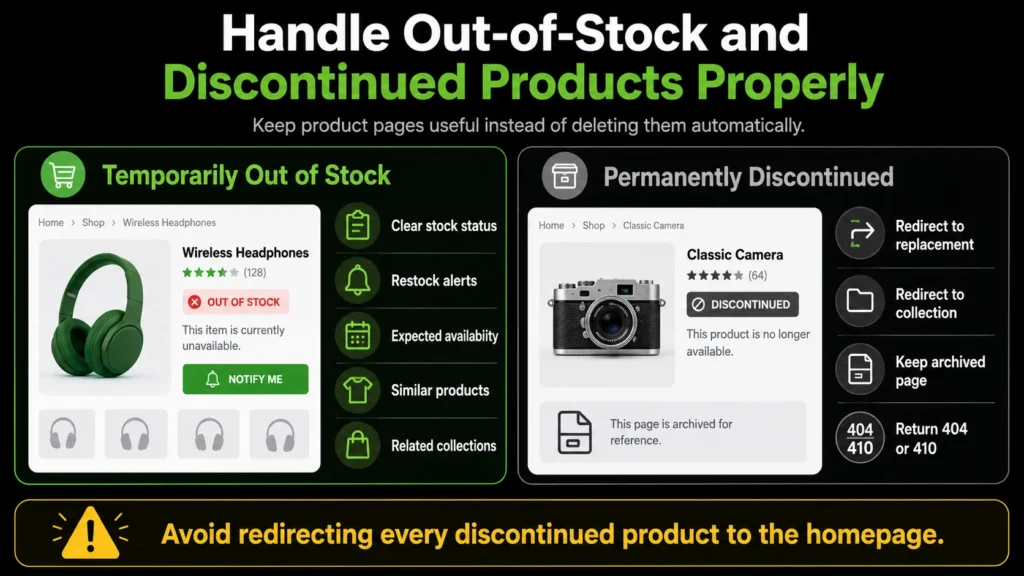
Do not automatically delete unavailable products.
Temporarily Out-of-Stock Products
Keep the page live when the item is expected to return.
Add:
- Clear stock status
- Restock notifications
- Expected availability
- Similar products
- Related collections
Permanently Discontinued Products
Choose the best action based on traffic, backlinks, demand, and replacement availability.
Options include:
- Redirecting to a close replacement
- Redirecting to a relevant collection
- Keeping an archived information page
- Returning a 404 or 410 response
Avoid redirecting every discontinued product to the homepage.
Use Shopify Content to Support Product Discovery
Shopify blog content should support the store rather than attract unrelated traffic.
Useful content formats include:
- Buying guides
- Product comparisons
- Size guides
- Care guides
- Compatibility guides
- Gift guides
- Use-case articles
Find topics through:
- Search Console
- Customer-support questions
- Product reviews
- Internal site search
- Sales conversations
- Returns data
Each article should guide readers towards relevant collections, products, or supporting resources.
Build Relevant Backlinks and Brand Authority
Backlinks remain important for competitive ecommerce rankings.
Useful strategies include:
- Product reviews from relevant publishers
- Digital PR campaigns
- Original research or trend reports
- Supplier and manufacturer links
- Approved stockist pages
- Industry partnerships
- Unlinked brand mention reclamation
- Product comparison features
Avoid low-quality paid links, automated link campaigns, and irrelevant guest posts.
Focus on relevance, useful content, real audiences, and editorial value.
Track Organic Revenue, Not Just Rankings
Traffic and rankings do not show the full value of Shopify SEO.
Track:
| Metric | Why it matters |
| Organic clicks | Measures search visibility |
| Non-brand clicks | Shows new customer discovery |
| Organic revenue | Measures direct commercial value |
| Conversion rate | Shows traffic quality |
| Add-to-cart rate | Measures product engagement |
| Checkout completion | Reveals funnel performance |
| Revenue per organic session | Measures traffic efficiency |
| Collection-page revenue | Shows category SEO value |
| Product-page revenue | Shows product SEO value |
Evaluate different page types according to their role.
A blog post may assist a later purchase, while a collection or product page may generate direct revenue.
Common Shopify SEO Mistakes to Avoid
Avoid these common problems:
- Copying manufacturer descriptions
- Ignoring collection page content
- Indexing every filter combination
- Installing multiple apps for the same SEO task
- Creating duplicate schema
- Deleting product pages without reviewing their value
- Redirecting all removed products to the homepage
- Leaving products without internal links
- Publishing unrelated blog content
- Ignoring mobile usability
- Measuring traffic without measuring sales
How Long Does Shopify SEO Take?
Shopify SEO is a long-term growth strategy.
| Period | Main priority |
| Weeks 1–4 | Audit, tracking, keyword mapping, and technical fixes |
| Months 2–3 | Product content, collections, internal linking, and speed |
| Months 3–6 | Content growth, backlinks, and conversion improvements |
| Months 6–12 | Competitive growth, authority, and market expansion |
Results depend on competition, domain history, catalog size, technical condition, content quality, internal linking, backlinks, and inventory stability.
No responsible SEO provider should guarantee a fixed ranking or exact timeline.
Turn Shopify Search Visibility Into Sustainable Revenue
Shopify SEO is most effective when technical improvements, product content, collection pages, internal linking, site speed, and authority building work together. Rankings alone are not the final goal. The real value comes from helping the right customers discover relevant products, compare options confidently, and complete purchases.
A well-optimized Shopify store can reduce dependence on paid advertising, strengthen long-term visibility, and create a more reliable source of qualified ecommerce traffic.
MoxSEO helps Shopify businesses identify technical issues, improve product and collection performance, strengthen content strategy, and connect organic traffic with measurable revenue.
Request a Shopify SEO audit from MoxSEO to uncover the highest-impact opportunities for improving rankings, product discovery, and organic sales.
Frequently Asked Questions About Shopify SEO
Is Shopify Good for SEO in 2026?
Yes. Shopify provides a strong technical foundation with secure hosting, mobile-friendly themes, canonical tags, XML sitemaps, and editable metadata. However, strong rankings still depend on keyword research, original product content, optimized collection pages, internal linking, site speed, structured data, and relevant backlinks.
How Do I Improve the SEO of My Shopify Store?
Start by auditing crawling, indexing, page speed, product content, collection pages, internal links, and structured data. Then build a keyword map, optimize priority commercial pages, control low-value filter URLs, improve Core Web Vitals, and track organic traffic alongside sales and revenue.
Are Shopify Collection Pages Important for SEO?
Yes. Collection pages are often the best pages for targeting broader commercial keywords because they allow customers to browse and compare several products. They should include descriptive titles, useful introductory content, unique metadata, relevant internal links, and buying guidance where needed.
How Can I Fix Duplicate Content on Shopify?
Verify canonical tags, link consistently to preferred product URLs, write original product and collection content, review filtered URLs, manage product variants carefully, and consolidate overlapping pages. Avoid blocking or redirecting URLs without first understanding how Google is crawling and indexing them.
Do Shopify SEO Apps Improve Rankings?
Shopify SEO apps can help with specific tasks such as image compression, redirects, broken-link detection, structured data, or metadata management. However, they cannot replace keyword strategy, original content, technical auditing, internal linking, user experience, or authority building.
Related guides in Shopify SEO
- Shopify SEO Expert: How to Choose the Right One for Your Store
- Shopify SEO for Beginners: How to Get Your Products Found on Google
Need this handled for you? Explore our Shopify SEO service.