




If you own a local business, your customers are not searching for you by name. They are searching for what they need, where they are. “Dentist near me,” “best restaurant in Bandra,” “AC repair in Delhi.” These are local searches, and they drive foot traffic, phone calls, and revenue. A local SEO guide helps you capture those searches.
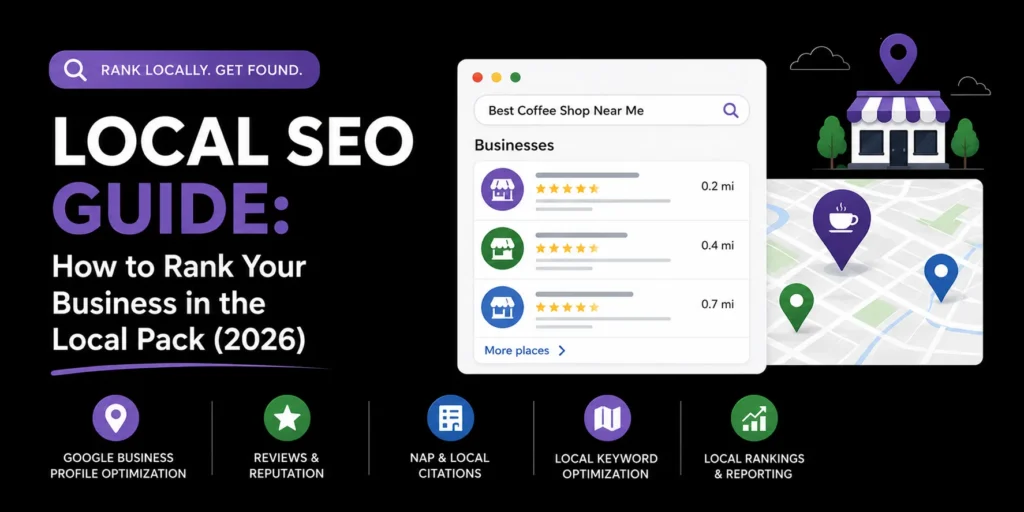
Local SEO is the process of optimizing your online presence so your business appears in local search results, especially the Google local pack (the map results at the top of the page). Whether you run a single storefront or a multi-location business, this guide walks you through everything you need to do to rank locally and win more customers from your area.
TL;DR: Local SEO comes down to optimizing your Google Business Profile, building consistent NAP citations across directories, creating location-specific pages, generating reviews, and earning local backlinks. Get these five pillars right and your business will rank higher in the local pack and Google Maps for searches in your area.
What Is Local SEO?
Local SEO is the practice of optimizing your business’s online presence to rank in location-based search results. When someone searches for a product or service with geographic intent (either explicitly, like “plumber in Pune,” or implicitly, like “plumber near me”), Google uses local SEO signals to decide which businesses to show.
Local search results come in two forms:
- The local pack: The map-based results that appear at the top of Google search, usually showing three businesses with their names, ratings, addresses, and review counts.
- Local organic results: Standard organic listings that appear below the local pack, often including location-specific pages from business websites.
Google determines local rankings using three core factors: relevance (how well your business matches the search), distance (how close you are to the searcher), and prominence (how well-known and trusted your business is online). Every step in this guide improves one or more of these factors.
Step 1: Claim and Optimize Your Google Business Profile
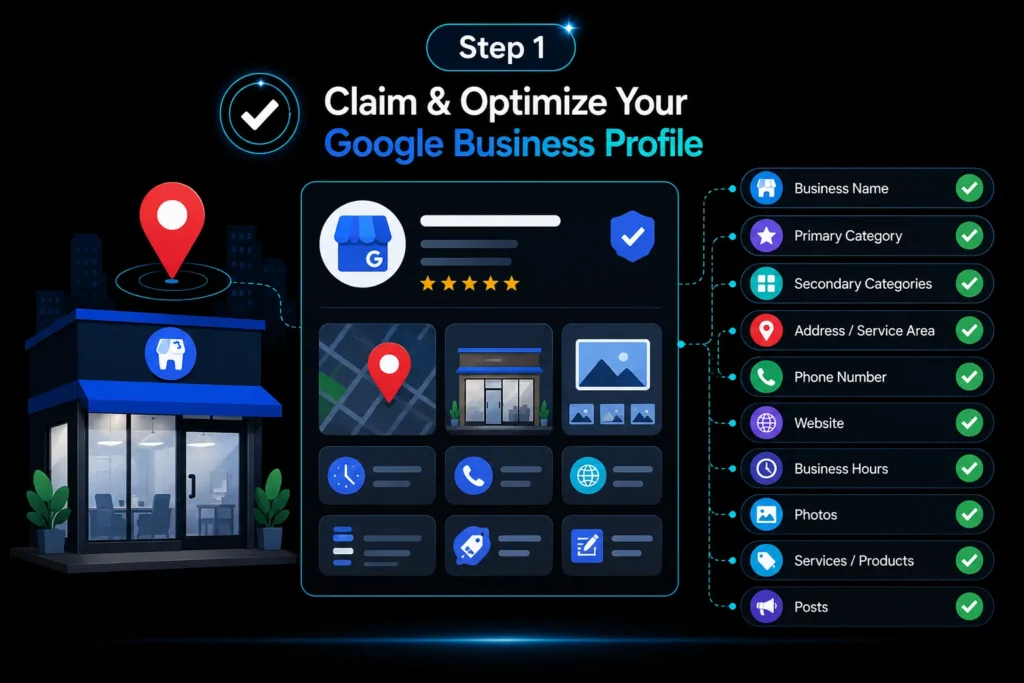
Your Google Business Profile (GBP) is the single most important factor in local SEO. It is what powers your listing in the local pack and Google Maps. If you have not claimed it yet, go to business.google.com and verify your business.
Once claimed, optimize every field:
- Business name: Use your real, legal business name. Do not add keywords or city names to manipulate rankings. Google can suspend your profile for keyword stuffing the name.
- Primary category: Choose the most accurate category. This is the single most important field for local pack ranking. If you are a dentist, choose “Dentist,” not “Health” or “Medical Clinic.”
- Secondary categories: Add categories for additional services you offer, but only if they genuinely apply.
- Address and service area: If you have a storefront, list your physical address. If you serve customers at their location (like a plumber or electrician), set your service area instead.
- Phone number: Use a local phone number with the right area code. This signals to Google that you are a local business.
- Website: Link to your homepage or a dedicated location page, not a social media profile.
- Business hours: Keep these accurate and update them for holidays. Incorrect hours are one of the top reasons customers leave negative reviews.
- Photos: Add high-quality photos of your storefront, interior, team, and products. Businesses with more photos get more clicks and calls. Add new photos regularly.
- Services and products: List every service you offer with descriptions and prices where applicable.
- Posts: Use Google Business Profile posts to share updates, offers, events, and new products. Posts keep your profile active and give customers a reason to engage.
Step 2: Build Consistent NAP Citations
NAP stands for Name, Address, and Phone number. Your NAP information needs to be consistent across every directory, listing, and website where your business appears. Google cross-references your NAP across the web to verify your business is real and located where you say it is.
Inconsistent NAP information (different addresses, different phone numbers, misspelled business names) confuses Google and hurts your local rankings.
Where to build citations:
- Major directories: Google Business Profile, Bing Places, Apple Maps, Yelp, Facebook, TripAdvisor (if applicable), JustDial (in India), and Sulekha (in India).
- Industry-specific directories: Every industry has niche directories. Restaurants should be on Zomato and Swiggy. Hotels should be on Booking.com and MakeMyTrip. Find the directories your customers actually use.
- Local directories: Chamber of commerce, local business associations, and city business directories.
Use a tool like BrightLocal or Whitespark to find existing citations, check for inconsistencies, and build new ones at scale.
Step 3: Create Location-Specific Landing Pages
If you serve multiple cities or neighborhoods, create a dedicated landing page for each location. These pages help you rank in local organic results for city plus service searches (like “digital marketing agency in Mumbai”).
Each location page should include:
- City name in the title tag, H1, and meta description: For example, “Digital Marketing Agency in Ahmedabad| MoxSEO.”
- Location-specific content: Describe the services you offer in that city, mention local landmarks or neighborhoods, and include a map embed.
- NAP information: Display your business name, address, and phone number consistently on every location page.
- Customer reviews from that location: If you have reviews from customers in specific cities, feature them on the relevant location page.
- FAQ section: Answer common questions about your services in that city. This adds content depth and gives you FAQPage schema opportunities.
Do not create thin location pages with the same content but a different city name swapped in. Google penalizes doorway pages. Each location page needs genuinely unique, useful content.
Step 4: Generate and Manage Customer Reviews
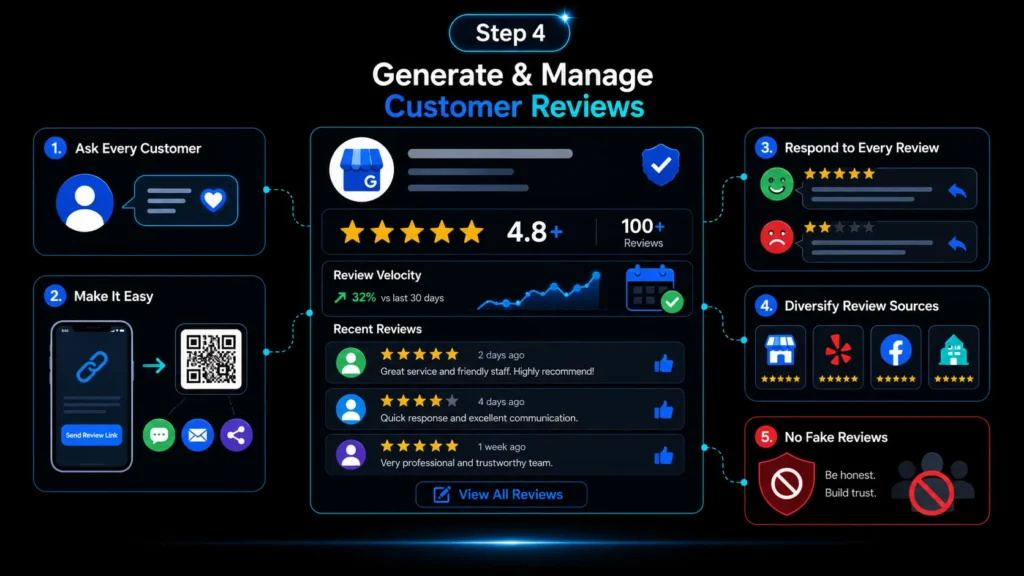
Reviews are one of the strongest local ranking factors. They affect both your position in the local pack and your click-through rate. Businesses with more reviews and higher ratings rank better and get more clicks.
How to build a review generation system:
- Ask every customer: The simplest approach is the most effective. Ask satisfied customers to leave a review. Do it in person, by email, or by SMS. Timing matters, ask right after a positive experience when the customer is happiest.
- Make it easy: Send a direct link to your Google review page. Do not make customers search for your business and figure out where to click.
- Respond to every review: Thank customers for positive reviews and address negative reviews professionally. Google values businesses that actively manage their reviews.
- Diversify review sources: Google reviews matter most, but reviews on Yelp, Facebook, and industry directories also contribute to your overall online reputation.
Never buy reviews or post fake reviews. Google actively detects and penalizes review manipulation, and the penalty can include losing your Business Profile entirely.
Step 5: Earn Local Backlinks
Backlinks from local websites signal to Google that your business is relevant and trusted in your community. Local backlinks are often easier to earn than national or industry backlinks because the competition is lower.
Ways to earn local backlinks:
- Sponsor local events or charities: Many events and charities list their sponsors on their websites with a link back.
- Join local business associations: Chambers of commerce and business networks often have member directories with links.
- Get featured in local media: Reach out to local newspapers, blogs, and news sites with story ideas or expert commentary.
- Partner with complementary local businesses: A wedding photographer could partner with a florist, caterer, and venue to cross-promote and link to each other.
- Create local resource pages: Build a guide or resource that is useful to people in your city (like “Best Parks in Mumbai” or “Pune Neighborhood Guide”) and earn links naturally.
Step 6: Optimize Your Website for Local Keywords
Your website content needs to target the local keywords your customers are searching for. This goes beyond just putting your city name in the title tag.
Key on-page local SEO elements:
- Title tags and meta descriptions: Include your primary service and city. For example, “Plumber in Pune | 24/7 Emergency Plumbing Services.”
- H1 tags: Your H1 should clearly state what you do and where. For example, “Pune Plumbing Services.”
- Location-specific content: Write about the areas you serve, local landmarks, and community involvement. This naturally includes local keywords without stuffing.
- Schema markup: Add LocalBusiness schema to your website with your NAP, business hours, geo-coordinates, and service area. This helps Google understand your business location and services.
- URL structure: Use location-specific URLs like yourdomain.com/services/pune or yourdomain.com/plumber-pune.
Step 7: Track Your Local SEO Performance
Local SEO is not a one-time project. You need to track your performance and adjust your strategy based on what the data tells you.
Key metrics to track:
- Local pack rankings: Use a tool like BrightLocal, Local Falcon, or Whitespark to track your position in the local pack for your target keywords.
- Google Business Profile insights: Track how many people view your profile, click for directions, call your business, or visit your website from your GBP listing.
- Review velocity: Track how many new reviews you get per month and your average rating.
- Organic traffic to location pages: Use Google Analytics and Search Console to see how much traffic your location-specific pages are getting.
- Conversion rate: Track how many website visitors from local search actually contact you, book an appointment, or make a purchase.
Start Ranking Locally
Local SEO is the most cost-effective way for local businesses to get found by customers in their area. The steps in this guide give you a complete framework, but the key is execution and consistency. Optimize your Google Business Profile, build citations, create location pages, generate reviews, and earn local backlinks, then keep doing it month after month.
If you want professional help with local SEO, MoxSEO offers local SEO services for businesses in India and globally. Get a free quote to see how we can help your business rank higher in local search.
Frequently Asked Questions
How long does local SEO take to work?
Local SEO typically takes 3 to 6 months to show meaningful results in the local pack. If your Google Business Profile is new or unoptimized, you may see improvements within the first month. Competitive industries and markets take longer. Consistency is the key, businesses that actively optimize their profile, build citations, and generate reviews over time see the best results.
How much does local SEO cost?
Local SEO services typically cost between $500 and $2,500 per month for a single-location business, depending on the market and competition. Multi-location businesses pay more. In India, local SEO services are significantly cheaper, often starting around ₹15,000 per month. The cost depends on the scope of work, number of locations, and competitiveness of your industry.
What is the most important factor in local SEO?
Your Google Business Profile is the most important factor. It directly powers your local pack and Google Maps listing. After that, reviews and NAP citation consistency are the next most impactful factors. If you only do one thing, claim and fully optimize your Google Business Profile.
Do I need a website for local SEO?
You can rank in the local pack with just a Google Business Profile, but having a website significantly improves your chances. A website lets you create location-specific pages, target local keywords, add schema markup, and capture organic traffic beyond the local pack. Google also favors businesses with websites in local rankings.
How do I rank in multiple cities for local SEO?
To rank in multiple cities, create a dedicated location page for each city you serve, build citations for each location, and earn local backlinks from each market. If you have physical addresses in multiple cities, create a Google Business Profile for each location. Do not create thin doorway pages with the same content but different city names, as Google penalizes this.
Related guides in Local SEO
- Local SEO Packages: What to Include, What to Pay, and What to Avoid
- Local SEO Services Near Me: How to Rank in Your Area
- Local SEO Strategy: A Complete Guide to Ranking in the Local Pack (2026)
- Local SEO Company: How to Choose the Right One for Your Business
- Local SEO Consulting: What It Is and How It Grows Your Business
Need this handled for you? Explore our Local SEO service.