




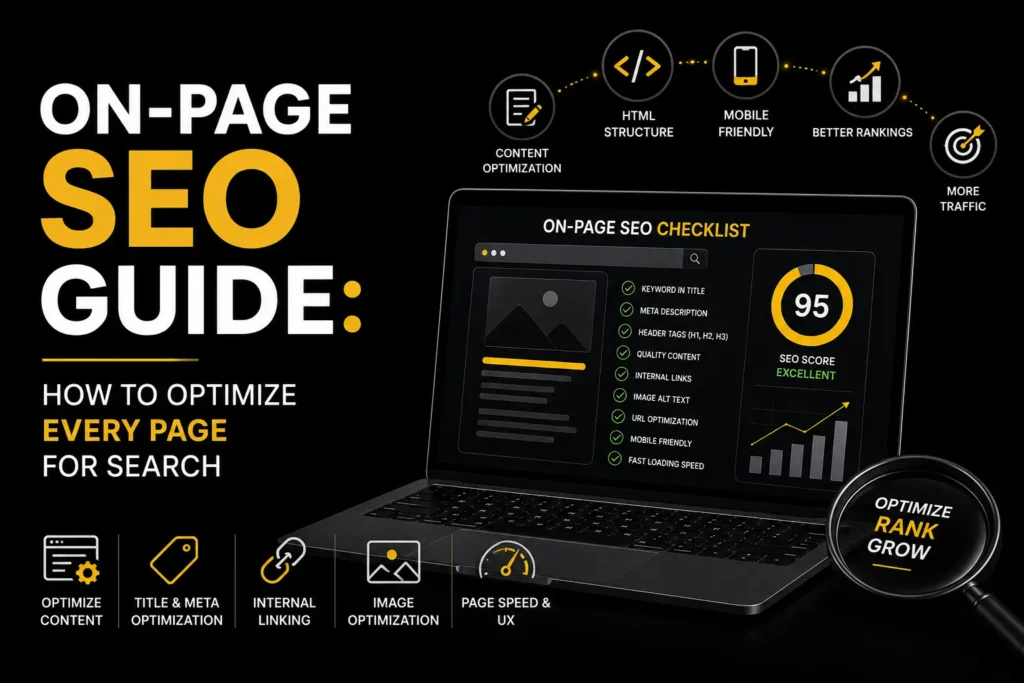
On-page SEO is the practice of optimizing individual web pages to rank higher in search results. Unlike technical SEO (which deals with site infrastructure) and off-page SEO (which deals with backlinks), on-page SEO is about what is on the page itself: the content, the HTML tags, the images, and the internal links. It is the most directly controllable part of SEO because you can change it yourself.
This on-page SEO guide covers every element you need to optimize on each page to maximize your search rankings. For keyword targeting strategy, see our keyword research guide.
Short answer: To optimise a page, choose one primary search intent, then make sure the title tag, H1, opening paragraph, body content, images, internal links and structured data all clearly serve it. Write for the reader first, keep each element accurate and specific, and check the result with an audit tool. Our free on-page audit checks many of these elements in one pass.
TL;DR: On-page SEO involves optimizing title tags, meta descriptions, headings, content, images, internal links, and URL structure on each page. Every page should target one primary keyword, include it in the title tag and H1, and provide comprehensive content that satisfies search intent. MoxSEO offers SEO services that include on-page optimization.
How Does On-Page SEO Differ From Technical and Off-Page SEO?
| Type | What it covers | Who usually controls it | Example task |
|---|---|---|---|
| On-page SEO | Content and HTML of a single page | Content, SEO and marketing teams | Rewrite a title tag and add internal links |
| Technical SEO | Crawling, indexing, speed and site infrastructure | Developers and technical SEOs | Fix redirects, rendering or robots.txt rules |
| Off-page SEO | Signals from outside the site, mainly links and mentions | PR, content and outreach teams | Earn a citation from a relevant publication |
The Key On-Page SEO Elements
1. Title Tags
The title tag is the most important on-page SEO element. It appears in search results, in browser tabs, and when your page is shared on social media. Include your primary keyword near the beginning, keep it under 60 characters so Google does not truncate it, and make it compelling enough to earn the click. Google’s title element documentation explains how Google uses title tags in search results.
Sixty characters is a rule of thumb. Google truncates by pixel width, not character count, so a title in capitals or with wide letters can be cut sooner. Put the words that identify the page first, keep your brand at the end, and note that Google may rewrite a title it considers unhelpful for a query.
2. Meta Descriptions
The meta description is the short text that appears under your title in search results. Google says it may use the meta description to build your snippet when it describes the page better than the page text; it does not present it as a ranking factor. Aim for a concise description, include your target keyword, and make it compelling. Think of it as an ad for your page.
Google may show its own snippet instead if it judges another passage fits the query better; its guide to controlling snippets explains how. Write one distinct description per page and answer the likely question in the first clause. You can draft titles and descriptions with our meta tag generator.
3. Heading Structure (H1, H2, H3)
Every page should have exactly one H1 tag that includes the primary keyword. Use H2 tags for major sections and H3 tags for subsections. Do not skip heading levels (H1 to H4). Headings help Google understand your page structure and help readers scan your content.
Where it fits, phrase H2s as the questions people ask. That also gives answer engines a clear heading followed by a direct answer they can quote.
4. Content Optimization
Your content should be comprehensive enough to satisfy the searcher’s intent. Include your primary keyword naturally in the first 100 words. Use related keywords and synonyms throughout. Write for humans first, search engines second. Aim for depth: your page should cover the topic more thoroughly than the pages currently ranking for your target keyword. Google’s guidance on creating helpful, reliable, people-first content is the standard to follow.
Check intent by searching your keyword and noting what kind of page ranks: guide, product page, comparison or tool. If every result is a comparison and yours is a sales page, the format is wrong however well the tags are written. Open with the direct answer, then add the detail, examples and steps that make the page worth citing. Use our keyword research tool to find related questions.
5. URL Structure
URLs should be short, descriptive, and include the target keyword. Use hyphens to separate words (not underscores). Avoid long URLs with parameters, dates, or session IDs. A good URL looks like /services/seo/local/. A bad URL looks like /p=123&cat=5.
6. Image Optimization
Every image should have descriptive alt text that includes relevant keywords where natural. Compress images to reduce file size. Use WebP format where possible. Specify width and height attributes to prevent layout shift. Use descriptive file names (like local-seo-guide.jpg, not IMG_1234.jpg). For more on page speed factors, see our Core Web Vitals guide.
Alt text exists first for people who cannot see the image, so describe what it shows and why it is on the page. Google’s image best practices cover alt text, file names and image sitemaps.
7. Internal Linking
Link from each page to other relevant pages on your site. Internal links help Google understand your site structure and distribute authority across pages. Use descriptive anchor text that includes the target keyword of the page you are linking to. Aim for 3 to 5 internal links per page to relevant content. For link building strategies beyond internal links, see our link building strategies guide.
To find pages that should link to each other, try our internal link finder.
8. Schema Markup
Add structured data to your pages to help Google understand the content type. Use Article schema for blog posts, Service schema for service pages, FAQPage schema for FAQ sections, and Product schema for product pages. Schema does not directly boost rankings but improves visibility and click-through rates. See our complete schema markup guide for implementation details.
Always validate markup before and after changes with the schema markup validator, and make sure the markup matches what visitors can see on the page. Google’s structured data introduction lists supported types.
How Do You Run an On-Page SEO Audit Step by Step?
- Pick the page and its target query. One page, one main intent. If two pages target the same query, decide which one should win.
- Check the SERP. See what kind of pages rank and what questions they answer that yours does not.
- Review the title tag and H1. Do they name the topic clearly and match what the page delivers?
- Read the first 100 words. Does the page answer the main question early?
- Scan headings. Can a reader understand the page from the headings alone? Are there gaps compared with competing pages?
- Check images, links and markup. Alt text present, internal links to and from relevant pages, valid structured data.
- Run an automated check with the on-page audit tool to catch missing or duplicate tags, then fix issues in order of impact.
- Record the change and review in Search Console after a few weeks, looking at impressions, clicks and average position for the target query.
A Worked Example: Rewriting One Page
This example is hypothetical. Imagine a page about a local accounting firm’s tax filing service with the title “Home – Services” and an H1 reading “Welcome”. A rewrite would change the title to name the service and location, make the H1 state the service, open with two sentences saying who the service is for and what it includes, and convert the generic “Our process” block into question-style headings such as “What documents do I need?” and “How long does filing take?”. It would then add alt text to the team photo, link to related pages on deadlines and pricing, and add Service and FAQPage markup that matches the visible text. None of these steps require guesswork about ranking factors; each makes the page clearer for a reader.
Common On-Page SEO Mistakes to Avoid
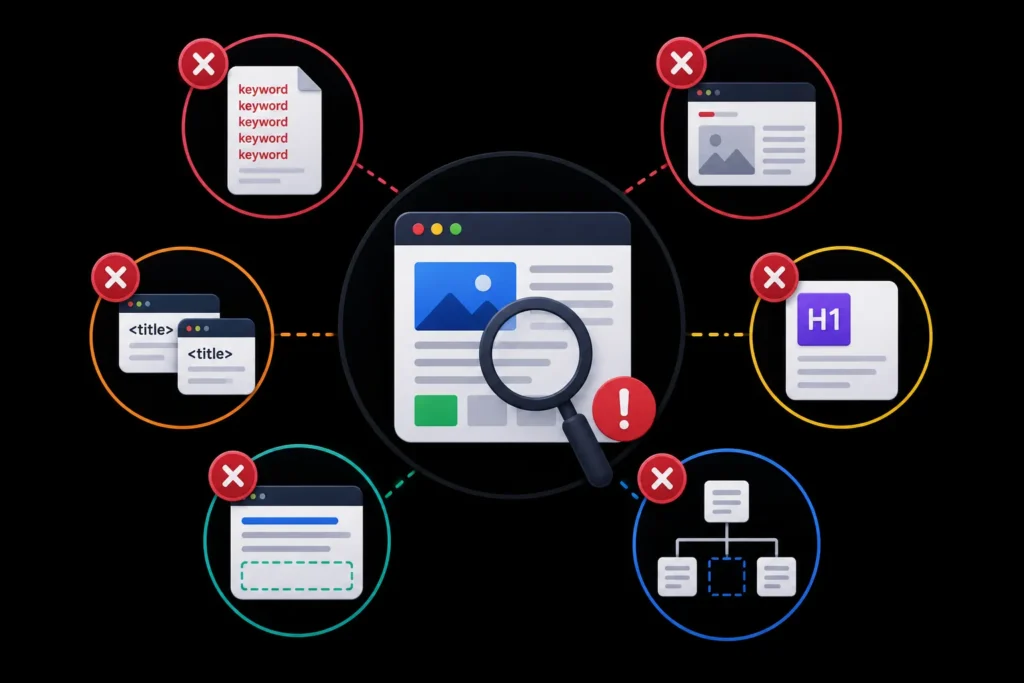
- Keyword stuffing: Repeating your keyword unnaturally many times. Write for humans first.
- Thin content: Pages with very little text that do not fully answer the searcher’s question.
- Duplicate title tags: Multiple pages with the same title tag confuse Google about which page to rank.
- Missing H1 tags: Every page needs exactly one H1 that includes the primary keyword.
- Ignoring meta descriptions: They are not presented as a ranking factor, but they can shape the snippet people see.
- No internal links: Pages with no internal links are harder for Google to discover and understand.
| Mistake | How to check | How to fix |
|---|---|---|
| Duplicate title tags | Crawl the site or run the audit tool and sort by title | Write a unique title for each page; merge pages that compete for the same query |
| Thin content | Compare your page with those ranking for the query | Add the missing questions, examples and steps; remove or merge pages with nothing to add |
| Two pages for one query | Search the query with site: and check which URL Google shows | Combine them and redirect the weaker URL |
| Orphan pages | No internal links point to the page | Link from related pages and navigation |
| Markup mismatch | Structured data describes content not visible on the page | Align the markup with visible content or remove it |
If you would rather have specialists handle this across a whole site, see our SEO services. The guidance here is reviewed by Sakshi Kumari and Ashish Khan, SEO specialists at MoxSEO.
Ready to Improve Your On-Page SEO?
Well-optimized titles, content, headings, images, and internal links can help your pages rank higher and attract more qualified traffic.
Want better search visibility? Get a free on-page SEO consultation from MoxSEO.
Frequently Asked Questions
What is on-page SEO?
On-page SEO is the practice of optimizing elements on your web pages to rank higher in search results. This includes title tags, meta descriptions, headings, content, images, internal links, URL structure, and schema markup. Unlike off-page SEO (backlinks) and technical SEO (site infrastructure), on-page SEO is fully under your control.
How long does on-page SEO take to work?
On-page SEO changes can show results in 2 to 4 weeks for pages that are already indexed. For new pages, it can take 3 to 6 months to rank. The timeline depends on the competitiveness of the keyword, the authority of your site, and how well your content matches search intent.
What is the most important on-page SEO factor?
The title tag is the most important on-page SEO element, followed by the H1 tag and the content itself. But on-page SEO is not about one single factor. It is about getting all the elements right together: title, headings, content, images, internal links, and schema.
How many keywords should I target per page?
Target one primary keyword per page, plus 3 to 5 related secondary keywords. Trying to target too many keywords on one page dilutes relevance and confuses Google. If you have multiple keywords to target, create separate pages for each.
Does meta description affect rankings?
Google says it may use the meta description to build your snippet when it describes the page better than the page text, and does not present it as a ranking factor. Write compelling, concise meta descriptions that include your target keyword.
Why does Google show a different title or snippet than the one I wrote?
Google may rewrite titles and snippets when it thinks another version better matches the query or the page content. Make the declared title accurate and specific to the page, and write descriptions that answer the likely question directly.
How often should I update on-page SEO?
Review important pages when rankings or clicks drop, when the topic changes, or at least once or twice a year. Update facts and dates, fill gaps against competing pages and check that titles and links still make sense.
Is on-page SEO different for AI search and answer engines?
The basics are the same: clear headings, direct answers near the top, accurate facts and valid structured data. Our AI answer extractability checker tests whether a page is structured so answers can be quoted.
Should I use the exact keyword in the H1 and title tag?
Use the main keyword or a close natural variant in both, but do not force it. Clarity for the reader comes first, and a title that reads naturally usually earns more clicks.
Can I do on-page SEO myself or do I need an agency?
Most site owners can handle titles, headings, content, images and internal links with a checklist and an audit tool. An agency or specialist helps most on large sites, many templates, or when pages already compete with each other.