





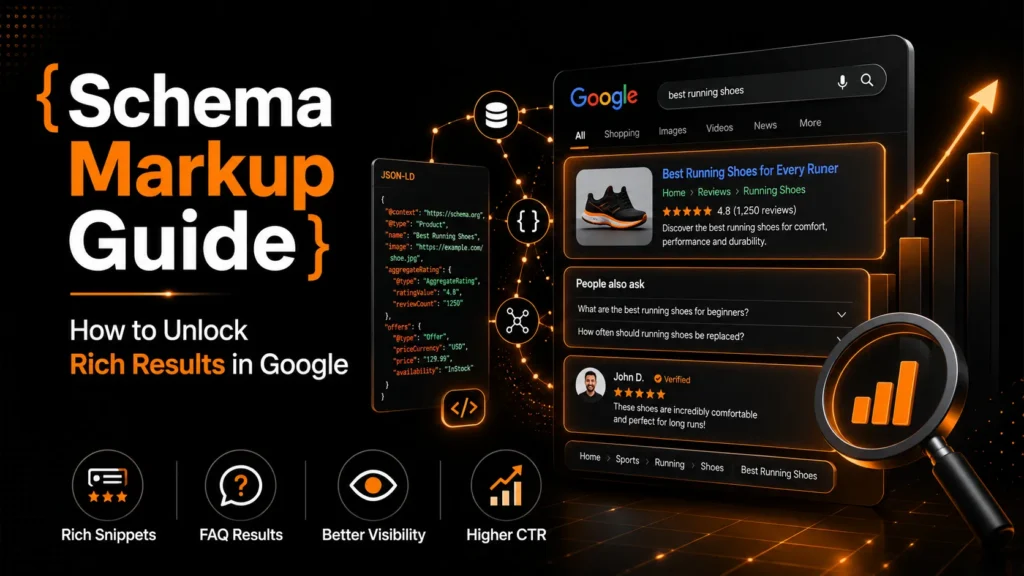
Schema markup helps search engines understand the meaning and relationships behind the information on a webpage. It can identify a business, author, product, article, event, location or other entity in a machine-readable format.
When implemented correctly, structured data may also make eligible pages available for enhanced Google Search features such as product information, event details, article features and breadcrumbs.
However, schema markup is often misunderstood. Adding a valid Schema.org type does not automatically create a rich result. Some structured-data types help describe entities without producing a special Google appearance, while several search features that existed in the past are no longer supported.
This schema markup guide explains how structured data works in 2026, which types Google currently supports, how to implement JSON-LD and how to avoid common mistakes.
TL;DR: Schema markup is structured data that describes the entities and content on a webpage. JSON-LD is generally the easiest format to manage. Valid markup can improve machine understanding and make eligible pages available for supported rich results, but it does not directly increase rankings or guarantee enhanced search results. Always check Google’s current structured-data gallery, ensure the markup matches visible page content and test the live implementation before publishing.
What Is Schema Markup?
Schema markup is structured data added to a website to describe the meaning of its content in a format that machines can process.
It uses the shared vocabulary published by Schema.org. This vocabulary contains different types and properties for describing entities such as:
- Organisations;
- Local businesses;
- People;
- Products;
- Articles;
- Events;
- Videos;
- Recipes;
- Job listings;
- Reviews;
- Breadcrumbs.
For example, a person reading a restaurant webpage may easily recognise the restaurant’s name, address, opening hours, cuisine and menu. Search systems may interpret that information more accurately when it is also provided through structured data.
Schema markup does not replace the visible content on the page. It should reinforce and accurately describe information that users can already access.
Schema.org and Google Structured Data Are Not the Same
This distinction is essential.
Schema.org provides a large vocabulary of valid types and properties. Google supports only selected structured-data types for specific Search features.
A schema type may therefore be valid without producing a dedicated Google rich result.
For example:
Serviceis a valid Schema.org type, but Google does not provide a dedicated Service rich-result feature;Personcan describe an author or professional, but it does not automatically generate a special Person result;FAQPageremains part of Schema.org, but Google no longer displays FAQ rich results;HowToremains valid vocabulary, but Google no longer displays HowTo rich results.
Before implementing markup for a visible Search enhancement, verify that Google currently supports that feature.
What Is JSON-LD?
JSON-LD stands for JavaScript Object Notation for Linked Data. It is a structured-data format typically placed inside a script block in the page’s HTML.
Google supports three main structured-data formats:
- JSON-LD;
- Microdata;
- RDFa.
JSON-LD is generally the preferred format because it can be added without inserting structured-data attributes throughout the visible HTML.
A basic Organisation example looks like this:
<script type="application/ld+json">
{
  "@context": "https://schema.org",
  "@type": "Organization",
  "@id": "https://example.com/#organization",
  "name": "Example Company",
  "url": "https://example.com/",
  "logo": "https://example.com/images/logo.png"
}
</script>
The markup should use the correct business information and match what appears on the website.
Does Schema Markup Improve Rankings?
Schema markup is not a direct ranking guarantee.
Adding structured data does not automatically move a page to the first position or make weak content competitive. Rankings still depend on factors such as:
- Search intent;
- Content quality;
- Relevance;
- Website accessibility;
- Internal linking;
- Page experience;
- Brand authority;
- Competition;
- Overall technical health.
Structured data can help search systems interpret the page more clearly and may make eligible content available for enhanced Search features.
Those enhancements can make a listing more informative or visually distinct, but Google decides whether a rich result appears. Correct markup only establishes potential eligibility.
Why Schema Markup Matters
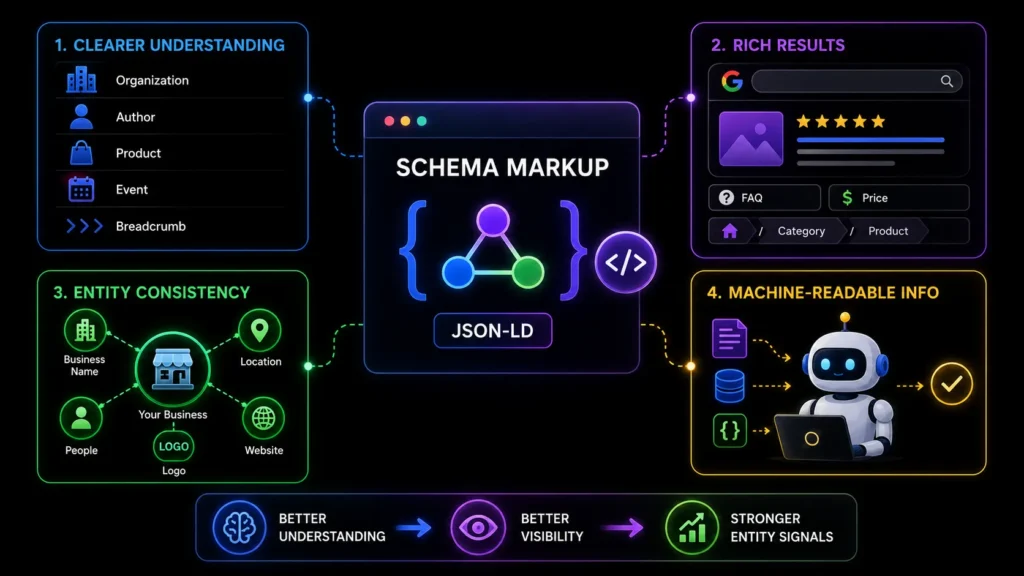
Clearer Search-Engine Understanding
Structured data provides explicit information about the main entities on a page.
It can help clarify:
- The organisation that owns a website;
- The author of an article;
- The relationship between a page and a business;
- The price and availability of a product;
- The location and timing of an event;
- The order of pages within a breadcrumb path.
This is particularly useful when a page contains several people, organisations, products or locations.
Rich-Result Eligibility
Some supported schema types can make pages eligible for enhanced Google Search features.
Examples may include:
- Product information;
- Event details;
- Job postings;
- Recipes;
- Articles;
- Videos;
- Breadcrumbs;
- Organisation information;
- Local business information.
Eligibility does not guarantee display. Google may choose a standard result even when the structured data is valid.
Entity Consistency
Organisation, LocalBusiness and Person markup can help reinforce consistent entity information across a website.
For example, an organisation entity may connect:
- The business name;
- Website URL;
- Logo;
- Contact information;
- Social profiles;
- Founders or employees;
- Physical locations;
- Published content.
Schema does not create authority by itself. It should support accurate information already demonstrated through the website and trusted external sources.
Machine-Readable Information
Structured data can make facts and relationships easier for automated systems to process.
However, there is no guarantee that adding schema will make a website more likely to appear in AI-generated answers from ChatGPT, Google AI Overviews, Perplexity or other systems.
Strong content, crawlability, factual accuracy, authority and consistency remain more important than schema alone.
Common Schema Types in 2026
Organization
Organisation markup describes a company, institution or other organisation.
Useful properties may include:
- Name;
- URL;
- Logo;
- Contact points;
- Founding information;
- Social profiles;
- Legal name;
- Address.
It is commonly placed on the homepage or a central page that clearly represents the organisation.
Avoid creating conflicting Organisation entities on every page.
LocalBusiness
LocalBusiness markup is appropriate for physical businesses or branches that serve customers from a location.
Useful properties include:
- Business name;
- Address;
- Telephone number;
- Opening hours;
- Location;
- Price range;
- URL;
- Geographic coordinates.
Use the most specific subtype available when possible. A restaurant should generally use Restaurant, while a medical clinic may use MedicalClinic.
Each genuine branch may need its own entity and stable identifier.
Article and BlogPosting
Article or BlogPosting markup can describe editorial content such as blog posts, guides and news articles.
Useful properties include:
- Headline;
- Author;
- Date published;
- Date modified;
- Featured image;
- Publisher;
- Main page URL.
Article markup is not required for a page to be indexed or ranked. It should be used when it accurately describes genuine editorial content.
Product
Product markup is designed for pages focused on a specific product or valid product variant.
It may include:
- Product name;
- Image;
- Description;
- Brand;
- SKU;
- Price;
- Currency;
- Availability;
- Shipping;
- Return information;
- Ratings where eligible.
The product, price and availability must match the visible page.
Do not use Product markup for ordinary service pages simply to obtain product-style results.
BreadcrumbList
Breadcrumb markup describes the page’s position within the website hierarchy.
For example:
Home → Services → Technical SEO → Schema Markup
Breadcrumb structured data can help Google understand the navigational path and may influence how the page hierarchy appears in Search.
Event
Event markup may be appropriate for genuine events with clear dates and attendance details.
It can describe:
- Event name;
- Start and end dates;
- Physical or virtual location;
- Organiser;
- Attendance mode;
- Ticket offers;
- Event status.
Do not use Event markup for business hours, appointment availability or ordinary promotional offers.
VideoObject
Video markup can describe video content published on a webpage.
Useful properties include:
- Video name;
- Description;
- Thumbnail;
- Upload date;
- Duration;
- Content URL;
- Embed URL.
The video should be visible and playable on the page.
Review and AggregateRating
Review markup requires special care.
Ratings and reviews should be:
- Genuine;
- Visible on the page;
- Related to the marked entity;
- Collected or displayed legitimately;
- Compliant with Google’s eligibility rules.
Do not copy ratings from Google Business Profile, Trustpilot or another platform into your own structured data without ensuring that the implementation is allowed and accurately represented.
Self-serving reviews for an organisation or local business may not be eligible for review-rich-result stars.
Service
Service is useful for describing services such as SEO, web development, consulting or maintenance.
Possible properties include:
- Service name;
- Provider;
- Description;
- Area served;
- Service audience;
- Offer details.
Service markup may help describe a service entity, but Google does not currently provide a dedicated Service rich result.
Schema Types That No Longer Produce Google Rich Results
FAQPage
FAQPage markup can still describe visible question-and-answer content through Schema.org.
However, Google stopped displaying FAQ rich results in Search in May 2026.
Do not promise FAQ accordions or expanded FAQ listings as an SEO benefit.
You may continue using FAQPage markup when it accurately describes the page and supports other systems or internal data requirements.
HowTo
HowTo remains a valid Schema.org type for instructional content.
However, Google no longer displays HowTo rich results.
A step-by-step guide can still rank as normal content, but adding HowTo markup does not create the former visual Search feature.
How to Choose the Right Schema Type
Start with the primary purpose of the page.
Ask:
- What is the main entity?
- What information is visible?
- Which schema type describes it most accurately?
- Does Google currently support a rich result for this type?
- Are the required and recommended properties available?
- Does another plugin already generate the same markup?
Avoid selecting a schema type only because it appears to offer an attractive rich result.
Suggested Page-Level Schema Map
| Page type | Suitable markup |
|---|---|
| Homepage | Organization or specific LocalBusiness |
| About page | AboutPage, Organization and Person where relevant |
| Contact page | ContactPage with organisation reference |
| Blog post | BlogPosting or Article |
| Product page | Product and Offer |
| Event page | Event and Offer where applicable |
| Service page | Service for semantic description |
| Author page | ProfilePage and Person |
| Location page | Specific LocalBusiness subtype |
| Navigational pages | BreadcrumbList |
This is a starting framework rather than a universal rule.
How to Implement Schema Markup

Step 1: Audit Existing Structured Data
Before adding new markup, inspect what the website already generates.
WordPress themes, ecommerce systems, SEO plugins, review plugins and page builders may automatically add structured data.
Common problems include:
- Duplicate Organisation entities;
- Conflicting business names;
- Multiple Product entities;
- Duplicate breadcrumbs;
- Different logo URLs;
- Incorrect canonical URLs;
- Repeated AggregateRating markup;
- Disconnected schema blocks.
Review the rendered HTML, not only the page editor.
Step 2: Identify the Primary Entity
Determine the main entity represented by the page.
For example:
- A homepage may primarily represent the organisation;
- A location page may represent one branch;
- A blog post primarily represents the article;
- A product page represents one product;
- An author page represents one person.
Keep the markup focused.
Step 3: Use Stable @id Values
An @id acts as a stable identifier for an entity.
Example:
"@id": "https://example.com/#organization"Other structured-data nodes can reference this identifier instead of redefining the organisation repeatedly.
Stable IDs can connect:
- The organisation;
- The website;
- The webpage;
- The author;
- The publisher;
- A local branch;
- A product.
Step 4: Use @graph for Connected Entities
An @graph can organise multiple related entities inside one JSON-LD block.
For example, a blog post may connect:
- The organisation;
- The website;
- The webpage;
- The author;
- The article;
- The breadcrumb path.
This often produces cleaner relationships than publishing several unrelated blocks.
Step 5: Match Visible Content
Every structured-data property should accurately represent information available to users.
Do not mark up:
- Hidden FAQs;
- Fake reviews;
- Outdated prices;
- Products that are unavailable;
- Services the business does not offer;
- Incorrect opening hours;
- Events that do not exist;
- Unsupported ratings.
Misleading markup can make a page ineligible for rich results and may lead to structured-data spam actions in serious cases.
Step 6: Add the JSON-LD
JSON-LD can be placed in the <head> or <body> section of the page.
It may be added through:
- Custom development;
- A content management system;
- An SEO plugin;
- A tag-management system;
- A custom schema module.
Use the method that gives you the strongest control and maintenance process.
Step 7: Validate Before Publishing
Use different tools for different purposes.
Google Rich Results Test
Use this to check markup that is eligible for a Google-supported rich result.
It can identify:
- Valid items;
- Critical errors;
- Non-critical warnings;
- Rich-result eligibility issues.
It does not validate every Schema.org type.
Schema Markup Validator
Use this for broader Schema.org syntax and vocabulary validation.
A type may validate successfully here even when Google does not support a rich result for it.
URL Inspection
Use Google Search Console’s URL Inspection tool to verify that Google can access and render the live page.
This helps identify problems such as:
- Blocked JavaScript;
- Missing rendered markup;
- Indexing restrictions;
- Canonical conflicts;
- Live-page differences.
Step 8: Monitor Search Console
Search Console may provide enhancement reports for supported structured-data features when relevant data is available.
These reports can help identify:
- Invalid items;
- Valid items with warnings;
- Affected URLs;
- Changes after deployment.
Search Console does not provide a complete inventory of every schema type on the website.
Common Schema Markup Mistakes
Adding Schema That Does Not Match the Page
Structured data must describe the visible content.
Adding Product markup to a service page or Event markup to ordinary business hours creates inaccurate information.
Using Outdated Rich-Result Advice
FAQ and HowTo markup no longer generate Google rich results.
Always verify current support before implementing schema for a Search feature.
Duplicating Plugin and Custom Markup
A website may already output Organisation, Article, Product or Breadcrumb schema.
Adding another block can create duplicate or conflicting entities.
Using the Wrong Business Type
Choose the most specific accurate type.
A restaurant should not use only a generic Organisation type when Restaurant better describes the local business.
Copying Third-Party Ratings
Do not copy an external platform’s aggregate rating into your schema without proper eligibility, visibility and rights.
Publishing Hidden Structured Data
Do not mark up information users cannot find on the page.
Using Outdated Information
Prices, availability, author information, locations and opening hours can change.
Schema should be updated whenever the visible content changes.
Expecting Guaranteed Rich Results
Valid markup does not force Google to display an enhanced result.
Schema creates eligibility, not entitlement.
How Often Should Schema Be Audited?
Structured data should be reviewed:
- After changing themes or plugins;
- After a site migration;
- After updating business information;
- After changing products or prices;
- After adding locations;
- After modifying content templates;
- When Search Console reports errors;
- When Google changes rich-result support.
For larger websites, include structured-data checks in regular technical SEO audits.
Implement Schema Markup with Confidence
Schema markup is most valuable when it accurately represents your content, connects the important entities on your website and follows the latest requirements for supported Search features.
Incorrect, duplicated or outdated structured data can create conflicting information and prevent pages from becoming eligible for enhanced results. Before adding new markup, review what your website already generates, confirm current Google support and build a maintenance process for future updates.
MoxSEO helps businesses audit, correct and implement structured data for organisations, local businesses, articles, products, locations and other relevant entities. We identify duplicate markup, missing relationships, validation errors and opportunities across your website.
Need accurate schema markup for your website? Request a structured-data audit from MoxSEO and discover how to improve entity clarity, resolve errors and strengthen eligibility for supported rich results.
Frequently Asked Questions
Does schema markup directly improve rankings?
No. Schema markup is not a direct ranking guarantee. It can help search systems understand content and may make eligible pages available for supported rich results. Rankings still depend on relevance, quality, authority, technical accessibility and competition.
Is JSON-LD better than Microdata?
Both formats are supported, but JSON-LD is generally easier to implement and maintain because it does not require structured-data attributes throughout the visible HTML.
Can I use multiple schema types on one page?
Yes, provided each type accurately represents visible content and the relationships are clear. Using connected entities with stable @id values and an @graph can reduce duplication.
Does FAQ schema still work?
FAQPage remains part of Schema.org, but Google stopped displaying FAQ rich results in May 2026. It should not be implemented with the expectation of receiving FAQ accordions in Google Search.
How do I test schema that Google does not support?
Use the Schema Markup Validator for general vocabulary and syntax. The Rich Results Test focuses primarily on features supported by Google Search.
Can schema guarantee product stars or ratings?
No. Review and AggregateRating markup must meet strict eligibility requirements, and Google decides whether review snippets appear. Self-serving ratings for organisations and local businesses may not be eligible.
Can schema help with AI search?
Structured data can make facts and entity relationships more machine-readable, but it does not guarantee citations or visibility in AI-generated answers. Accurate, useful and authoritative content remains essential.