




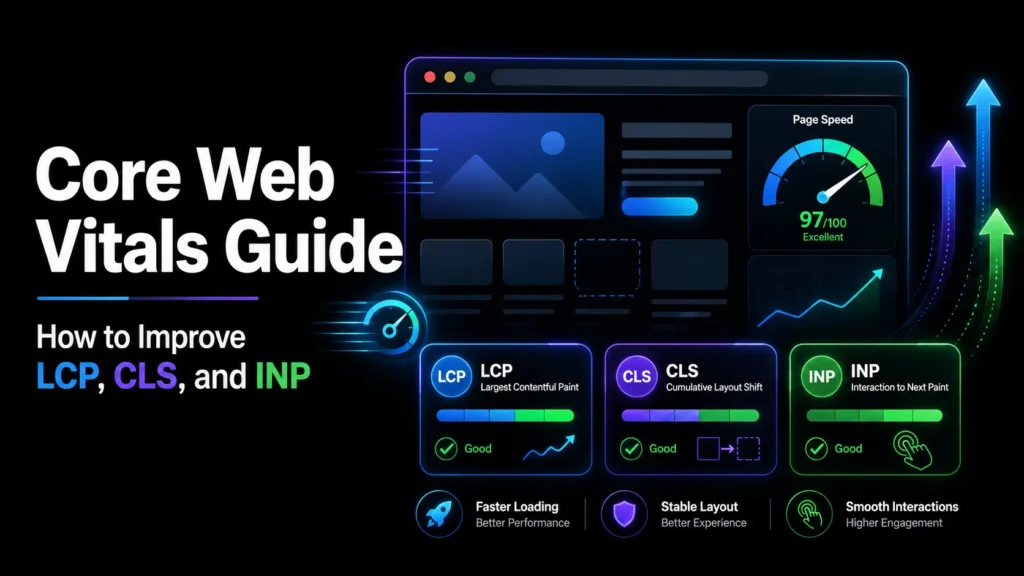
Core Web Vitals are Google’s official set of metrics for measuring real-world user experience on your website. They measure how fast your page loads, how stable it is visually, and how quickly it responds to user interaction. Google has confirmed that Core Web Vitals are a ranking factor, meaning slow, janky, or unresponsive pages will rank lower than fast, stable, responsive ones.
This guide explains what Core Web Vitals are, how to measure them, and how to improve them so your site ranks higher and provides a better experience for your visitors. For broader on-page optimization, see our on-page SEO guide.
TL;DR: Core Web Vitals are three metrics: Largest Contentful Paint (LCP, target under 2.5s), Cumulative Layout Shift (CLS, target under 0.1), and Interaction to Next Paint (INP, target under 200ms). Test with Google PageSpeed Insights. Improve LCP by optimizing images and server response, CLS by setting image dimensions, and INP by minimizing JavaScript. MoxSEO offers SEO services that include Core Web Vitals optimization.
Short answer: a page passes Core Web Vitals when, for at least 75% of real visits, the largest element loads within 2.5 seconds (LCP), the layout shifts by no more than 0.1 (CLS), and the page responds to taps and clicks within 200 milliseconds (INP). Google measures this from real Chrome users, not from a single speed test. As of October 2026, those are the three metrics and thresholds Google documents.
What Are Core Web Vitals?
Core Web Vitals are three specific metrics that Google uses to measure page experience:
1. Largest Contentful Paint (LCP)
LCP measures how long it takes for the largest visible element on your page to load. This is usually a hero image, a large heading, or a video. The target is under 2.5 seconds. If your LCP is above 4 seconds, Google considers it poor.
2. Cumulative Layout Shift (CLS)
CLS measures visual stability. It tracks how much your page layout shifts as it loads. If elements move around (images loading late, ads pushing content down, fonts causing text to reflow), your CLS score will be high. The target is under 0.1. If your CLS is above 0.25, Google considers it poor.
3. Interaction to Next Paint (INP)
INP measures how quickly your page responds to user interactions (clicks, taps, key presses). It replaced FID (First Input Delay) in 2024. The target is under 200 milliseconds. If your INP is above 500ms, Google considers it poor.
What Are the Core Web Vitals Thresholds and How Are They Scored?
Each metric has a “good” band and a “poor” band, with a “needs improvement” range in between. According to Google’s web.dev guidance on Web Vitals, a page should be assessed at the 75th percentile of page loads, segmented across mobile and desktop. In plain terms: if three out of four visits meet the “good” threshold, the page passes that metric. One fast test on your own laptop does not tell you that.
| Metric | What it measures | Good | Poor |
|---|---|---|---|
| LCP | Loading: when the main content appears | 2.5 seconds or less | Above 4 seconds |
| INP | Responsiveness: delay after clicks, taps and key presses | 200 milliseconds or less | Above 500 milliseconds |
| CLS | Visual stability: unexpected layout movement | 0.1 or less | Above 0.25 |
The “good” thresholds above are the ones web.dev publishes; the “poor” cut-offs are the ones used in PageSpeed Insights and Search Console. Check both tools for the current labels before you report numbers to a client or manager.
How to Measure Core Web Vitals
Use Google PageSpeed Insights (pagespeed.web.dev) to test your pages. It shows both lab data (simulated) and field data (real user data from the Chrome User Experience Report). Field data is what Google actually uses for rankings, so prioritize it over lab data. Google’s page experience guidance explains how these metrics affect rankings.
You can also use Google Search Console, which has a Core Web Vitals report showing which URLs are passing or failing each metric.
What is the difference between lab data and field data?
Lab data comes from a simulated load of one page on a fixed device and network. It is repeatable, so it is the right tool for testing a fix before you ship it. Field data is collected from real visitors across their own phones, networks and locations, so it is the right tool for judging whether the problem is solved. It is common for a page to look fine in the lab and still fail in the field, usually because real visitors use slower phones or connections than the test profile.
New or low-traffic pages may have no field data at all. In that case, use lab data to guide the work and check the Search Console report once enough visits have accumulated.
How to Improve Each Core Web Vital
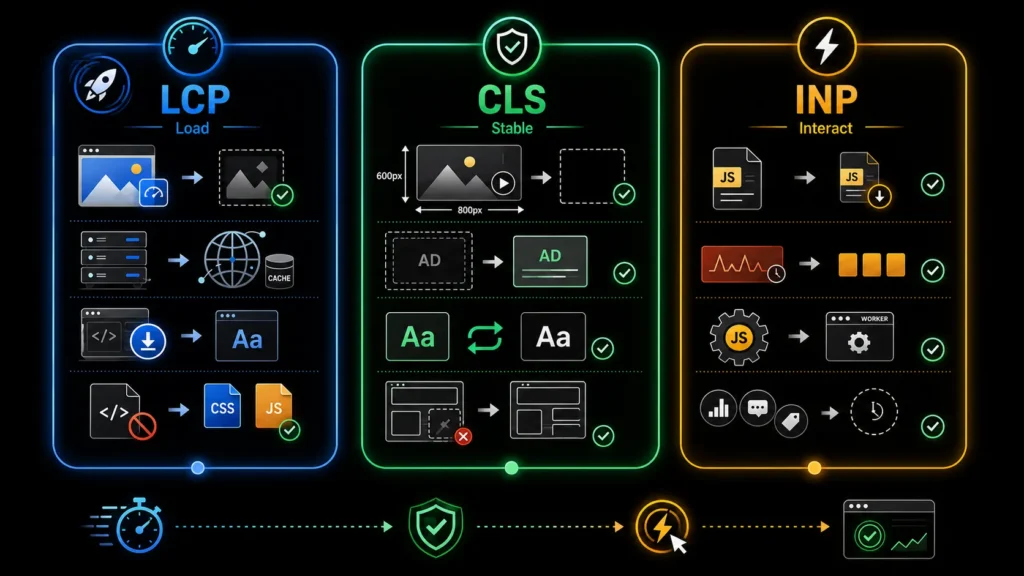
Improving LCP (Loading)
- Optimize images: Compress images, use WebP format, and set width and height attributes. Use lazy loading for images below the fold.
- Improve server response time: Use a CDN, upgrade your hosting, and enable caching. Target a server response time under 200ms.
- Preload critical resources: Use preload tags for your LCP image or font so the browser starts downloading it immediately.
- Eliminate render-blocking resources: Defer or async non-critical CSS and JavaScript so they do not block the initial render.
Improving CLS (Visual Stability)
- Set image and video dimensions: Always include width and height attributes on images and videos so the browser reserves space for them before they load.
- Reserve space for ads: If you show ads, reserve a fixed-size container for each ad slot so the layout does not shift when the ad loads.
- Preload fonts: Use font-display: swap and preload your web fonts so text does not reflow when the font loads.
- Avoid dynamically injected content: Content that appears above existing content pushes it down, causing layout shift. Insert new content below the fold or reserve space for it.
Improving INP (Interactivity)
- Minimize JavaScript: Remove unused JavaScript, defer non-critical scripts, and split large JavaScript bundles.
- Break up long tasks: Long JavaScript tasks block the main thread. Break them into smaller chunks using setTimeout or requestIdleCallback.
- Use a web worker: Move heavy computations to a web worker so they do not block the main thread.
- Optimize third-party scripts: Third-party scripts (analytics, chat widgets, ads) can significantly increase INP. Load them asynchronously or with a delay.
Why Is My LCP Slow? Break It Into Four Parts
“Make the page faster” is not a fix. Google’s guide to optimizing LCP splits the metric into four sub-parts, and each one points to a different cause:
- Time to first byte (about 40% of the LCP budget): the server is slow to respond. Look at hosting, caching, database queries and redirects.
- Resource load delay (under 10%): the browser finds the LCP image late, for example because it is set as a CSS background or injected by JavaScript. Make it discoverable in the HTML and preload it.
- Resource load duration (about 40%): the file itself is too heavy or too far away. Compress it, serve the right size for the screen, and use a CDN.
- Element render delay (under 10%): the element has downloaded but something blocks it from painting, usually render-blocking CSS or JavaScript.
Those percentages are guideline proportions from Google, not hard limits. The useful habit is to find which of the four parts is largest on your slow page and fix that one first. Compressing images will not help a page whose real problem is a slow server.
How Do I Fix Core Web Vitals Step by Step?
- Start with the Search Console report. Note which metric fails and whether the failing URLs are grouped by template (blog posts, product pages, category pages). Fixing one template often fixes hundreds of URLs.
- Pick one representative URL per failing group and run it through PageSpeed Insights. Read the field data first, then the diagnostics.
- Identify the cause, not the symptom. For LCP, find the LCP element and the largest of the four sub-parts. For CLS, find which elements shift. For INP, find the slow interaction and the script running at that moment.
- Fix the template, test in the lab, then deploy. Re-run the lab test to confirm the change worked before releasing it.
- Wait for field data to catch up. Because field data is a rolling 28-day window, Search Console will not show the full effect immediately. Check again after a few weeks rather than re-fixing a working change.
A hypothetical example: a services site has a Core Web Vitals report showing “LCP issue: longer than 2.5s” on all its location pages. They share one template with a large banner image loaded through a CSS background. The fix is one change to the template (output the banner as a normal image tag, correctly sized, and preload it), not a separate edit on every page. This is why grouping failing URLs by template matters.
What Are the Most Common Core Web Vitals Mistakes?
- Chasing a 100 Lighthouse score. Lighthouse is lab data. Google’s page experience signals rely on field data, so a perfect lab score on a page that fails in the field is not a pass.
- Lazy-loading the hero image. Lazy loading is for images below the fold. Delaying the LCP image makes LCP worse.
- Testing only on desktop. Mobile and desktop are assessed separately. Most failing sites fail on mobile first.
- Adding plugins and widgets without measuring. Chat widgets, pop-ups, tag managers and sliders are frequent causes of poor INP and CLS. Remove or delay anything that does not earn its place.
- Treating Core Web Vitals as the whole of SEO. They are one page experience signal. Relevant, helpful content still carries more weight, so fix vitals alongside content and technical SEO, not instead of them.
Where Do Core Web Vitals Fit in a Wider SEO Audit?
Performance work sits alongside crawlability, indexing and on-page quality. Our SEO services start with an audit of all of these because a fast page that cannot be crawled, or that does not answer the query, will not rank. If you want a quick on-page check before a deeper review, our free on-page audit tool is a reasonable first pass. If the fixes need template or theme changes, our web development team can make them, and website maintenance keeps scores from slipping after launch. You can read how we approach this on our methodology page.
Improve Your Core Web Vitals and Build a Faster Website
Core Web Vitals are not just technical scores. They reflect how real visitors experience your website when pages load, elements move, or interactions feel delayed. Improving LCP, CLS, and INP can make your site faster, more stable, easier to use, and better prepared to support stronger SEO and conversion performance.
Start by testing your key pages with PageSpeed Insights and Google Search Console. Focus first on the issues affecting the largest number of users, then optimize images, server response, fonts, JavaScript, third-party scripts, and layout stability. Small technical improvements can create a noticeable difference across your website.
MoxSEO helps businesses identify performance bottlenecks, diagnose Core Web Vitals problems, and create a practical optimization plan based on real data. Our team can review your site, prioritize high-impact fixes, and improve the overall user experience.
Request a free Core Web Vitals consultation and start improving your website performance today.
Frequently Asked Questions

Sakshi Kumari is an SEO Specialist at MoxSEO with expertise in keyword research, on-page SEO, content optimization, technical SEO, and link-building strategies. She focuses on improving organic visibility, strengthening website performance, and creating search-focused content that attracts relevant traffic. Through data-driven analysis and practical SEO execution, Sakshi helps businesses build stronger search presence and achieve sustainable digital growth.