





When someone asks ChatGPT, Perplexity or Claude a question that needs current information, the assistant often fetches web pages live, while the person waits. If your page is slow, blocked or empty when that fetch arrives, the assistant can’t read it and will answer from other sources instead.
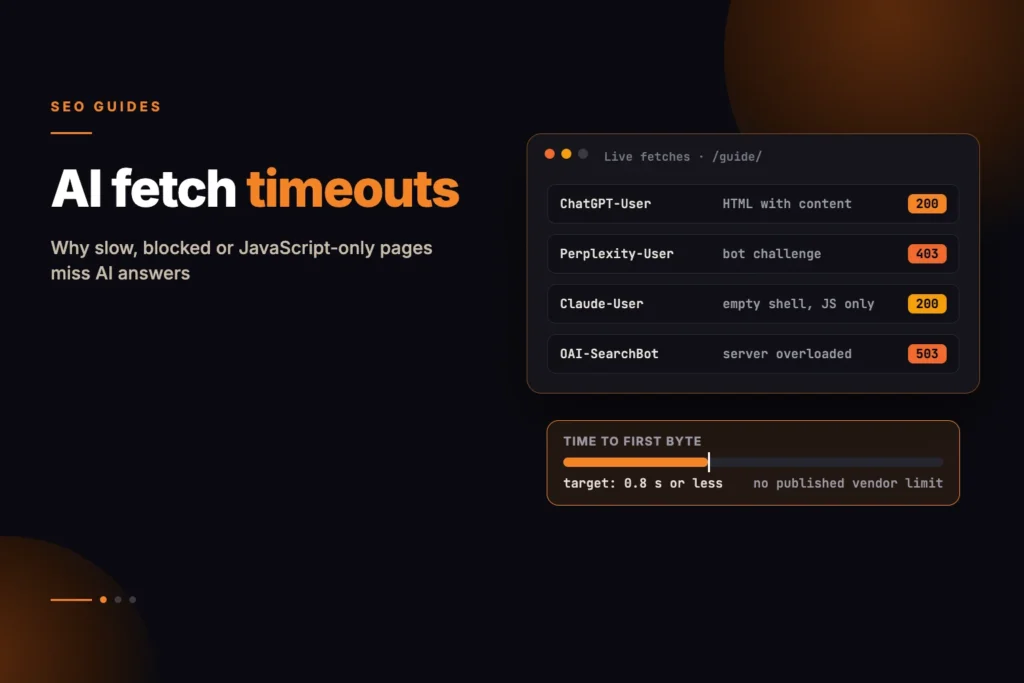
Short answer: No AI company publishes how long its fetchers wait for a page, so treat any exact “timeout” figure you see as a guess. What you can control is well documented: let the AI user agents through your firewall and bot protection, serve the main content in the HTML response rather than through JavaScript, and keep server response time low. web.dev considers a time to first byte (TTFB) of 0.8 seconds or less good, and that is a sensible target for AI fetchers too.
You can measure your own pages with our free AI Fetch Timeout Risk Checker, which times three fetches of a URL and rates the risk from the median. Its thresholds are our own rule of thumb, not vendor limits.
Which AI fetchers visit your site
Each assistant uses separate user agents for training crawls, search indexing and live fetches made on a user’s behalf. The live fetchers are the ones where speed matters most, because a person is waiting for the answer.
| Company | Search / index crawler | Live fetch for a user | Training crawler |
|---|---|---|---|
| OpenAI | OAI-SearchBot | ChatGPT-User | GPTBot |
| Perplexity | PerplexityBot | Perplexity-User | None (PerplexityBot is not used for training) |
| Anthropic | Claude-SearchBot | Claude-User | ClaudeBot |
OpenAI, Perplexity and Anthropic all publish IP ranges for their agents, which you can use to verify requests and to allow them through a firewall. OpenAI and Perplexity say their user-initiated fetchers may not follow robots.txt, because a person asked for the page; Anthropic says its bots, including Claude-User, follow robots.txt. Our AI Crawler Access Checker shows which of these agents your robots.txt allows.
What is actually known about timeouts
- No published limits. OpenAI’s, Perplexity’s and Anthropic’s crawler documentation gives no timeout or response-time figures. Anthropic only says it supports the non-standard Crawl-delay rule for slowing its crawler down.
- Live fetches are interactive. The assistant is building an answer in real time, so it has every reason not to wait long. That is a reasonable inference, not a documented number.
- A failed fetch affects that answer. Nothing in any vendor’s documentation says a slow response gets a domain permanently excluded. If a fetch fails, the page simply isn’t used for that answer; a later fetch can succeed.
- Google is different. AI Overviews and AI Mode draw on Google’s index, which Googlebot builds ahead of time. Google says there are no extra technical requirements to appear in them beyond being indexed and eligible for a snippet. Speed still matters for Googlebot: its crawl budget guide says crawling slows down when a site responds slowly or returns server errors.
The most common cause: bot protection, not speed
Many “timeouts” are really blocks. Bot protection that shows a JavaScript challenge, CAPTCHA or interstitial to unfamiliar clients stops AI fetchers just as it stops scrapers, because they can’t complete the challenge. The fetcher receives a challenge page or a 403 instead of your content.
- Check your firewall and bot-management logs for requests from ChatGPT-User, OAI-SearchBot, PerplexityBot, Perplexity-User and the Claude agents, and see what status they received.
- If you use Cloudflare, review the AI crawler settings: in July 2025 Cloudflare changed its default to block AI crawlers unless site owners allow them.
- Allow the published IP ranges for the agents you want, rather than allowing a user-agent string that anyone can fake. Perplexity recommends refreshing these lists on a schedule because they change.
- Make sure rate limits don’t return 429 to a fetcher that requests a handful of pages in quick succession.
Put the content in the HTML
A December 2024 study by Vercel and MERJ of AI crawler traffic found that none of the major AI crawlers rendered JavaScript, naming OpenAI’s GPTBot, OAI-SearchBot and ChatGPT-User and Anthropic’s ClaudeBot. They fetched JavaScript files but didn’t run them. Google’s Gemini, which uses Googlebot’s infrastructure, was the exception.
So a page that loads its text through client-side JavaScript can return quickly and still give an AI fetcher nothing to read. Server-render or pre-render the main content, headings and links. Our AI Answer Extractability Checker shows how much readable content a page returns without JavaScript.
The same study found ChatGPT and Claude spent about a third of their fetches on URLs that returned 404, and ChatGPT spent about 14% following redirects. Fix broken internal links and redirect chains so fetchers reach real pages in one request.
Reduce server response time
Time to first byte covers DNS lookup, connection and TLS setup, and the time your server takes to start sending the page. web.dev considers 0.8 seconds or less good. TTFB is not a Core Web Vital, but it sets a floor under everything else and is the part an impatient fetcher feels first.
- Cache full HTML pages for anonymous visitors at a CDN or in a page cache, so most requests never reach your application.
- Set cache headers that let the CDN serve pages, for example
Cache-Control: public, max-age=300, stale-while-revalidate=86400on articles that change rarely, and purge on publish. - Fix slow uncached responses as well: database queries, plugins and API calls made while rendering the page. Fetchers often request pages that aren’t in cache.
- Keep pages lean. Huge HTML documents take longer to transfer and parse. Move inline data and repeated markup out of the main document where you can.
- Watch for errors under load. Server errors are worse than slow responses, because the fetcher gets nothing.
How to measure it
Time a request from outside your own network, ideally from more than one region, with a command like this:
curl -s -o /dev/null \
  -A "Mozilla/5.0 (compatible; ChatGPT-User/1.0; +https://openai.com/bot)" \
  -w "status %{http_code}  ttfb %{time_starttransfer}s  total %{time_total}s  size %{size_download}B\n" \
  https://www.example.com/your-page/
Run it several times and look at the slowest result as well as the typical one. Then confirm with real traffic: filter your server or CDN logs for the AI user agents and check status codes and response times. Sending a fetcher’s user agent from your own machine only shows how your server treats that string; firewalls that verify IP ranges will treat a real fetcher differently.
A checklist
- AI user agents you want are allowed in robots.txt and not challenged or blocked by your firewall or CDN.
- Allow rules use the vendors’ published IP ranges, refreshed on a schedule.
- Main content, headings and links are in the HTML response without JavaScript.
- Anonymous page views are served from a page cache or CDN.
- TTFB is 0.8 seconds or less from the regions your audience is in, including uncached pages.
- No 5xx or 429 responses to AI fetchers in your logs.
- Internal links point straight to final URLs, with no broken links or redirect chains.
Frequently asked questions
How long do ChatGPT and Perplexity wait for a page to load?
Neither company publishes a timeout. Their crawler documentation covers user agents, IP ranges and robots.txt but gives no response-time limits. Aim for a time to first byte of 0.8 seconds or less, which web.dev considers good, and serve content in the HTML.
Will a slow response get my site permanently dropped by AI search?
There is no documentation saying so. A failed or slow fetch means the page isn’t used for that answer, and a later fetch can succeed. Repeated failures still cost you citations, so fix speed and blocking issues.
Does Cloudflare block AI crawlers?
It can. In July 2025 Cloudflare changed its default to block AI crawlers unless site owners allow them, and bot challenges also stop AI fetchers. Check your Cloudflare AI crawler and bot settings and your logs for the agents you want.
Do AI crawlers run JavaScript?
Mostly not. A December 2024 Vercel and MERJ study found OpenAI’s and Anthropic’s crawlers fetched JavaScript files but didn’t execute them, while Gemini, using Googlebot’s infrastructure, did. Put important content in the server-rendered HTML.
Is TTFB a Core Web Vital?
No. web.dev says TTFB is not a Core Web Vitals metric, but it affects Largest Contentful Paint and is the first delay any fetcher meets. A good TTFB is 0.8 seconds or less.
Do AI fetchers follow robots.txt?
Their search crawlers do, such as OAI-SearchBot, PerplexityBot and Claude-SearchBot. OpenAI and Perplexity say their user-initiated fetchers, ChatGPT-User and Perplexity-User, may not follow robots.txt because a person requested the page. Anthropic says Claude-User does follow it.