






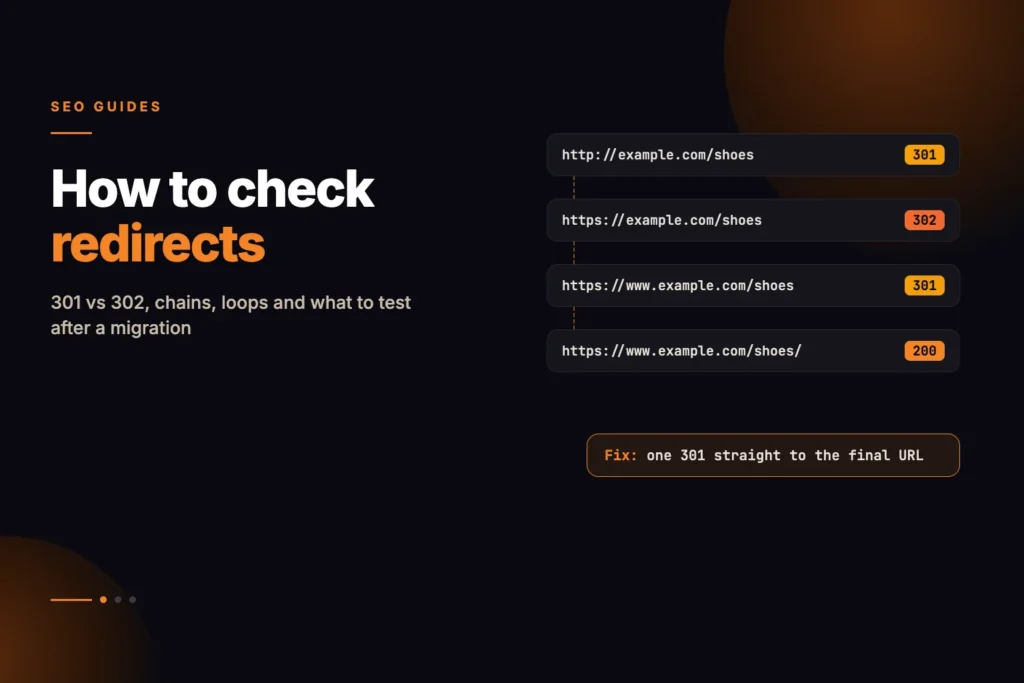
To check a redirect properly, you request the old URL without letting anything follow it automatically, note the status code and the Location header it returns, then request that target and repeat until you reach a page that answers with content. What you are looking for is three things: the right status code at every hop, as few hops as possible, and a final response that is a 200 on the page you meant.
Short answer: Run the old address through a redirect checker that lists every hop. A healthy result is one redirect, using 301 or 308 for a permanent move, ending in a 200 on the correct page. Two or more hops is a chain worth flattening, a URL that comes back to itself is a loop, and a 302 or 307 on a move that will never be reversed is the most common mistake after a migration.
Our free Redirect Checker does this one hop at a time, up to 10 redirects, and shows the status code, target and response time for each request. It flags loops, chains, temporary codes, HTTPS-to-HTTP downgrades and dead ends. This guide explains how to read that result, and the cases a server-side check cannot see.
What is the difference between 301, 302, 307 and 308?
All four tell the client that the resource is somewhere else and give the new address in the Location header. They differ on two questions: is the move permanent, and may the client change the request method when it follows the redirect. The HTTP semantics are defined in RFC 9110.
| Code | Meaning | Method on follow | How Google treats it |
|---|---|---|---|
| 301 Moved Permanently | Permanent | Clients may change POST to GET | Permanent: a strong signal the target should be canonical |
| 308 Permanent Redirect | Permanent | Method and body must be kept | Permanent, same as 301 |
| 302 Found | Temporary | Clients may change POST to GET | Temporary: not used as a canonical signal |
| 307 Temporary Redirect | Temporary | Method and body must be kept | Temporary, same as 302 |
| 303 See Other | Points to a different resource | Follow with GET | Temporary |
For SEO the method column rarely matters, because crawlers fetch pages with GET. The permanent-or-temporary column is what counts. Google’s documentation describes 301 and 308 as permanent redirects, which tell Google to show the new URL in search, and 302, 303 and 307 as temporary redirects, which keep the old URL in search and are not used as a canonical signal. A temporary code is not wrong in itself: it is the right answer for a page that really will come back, such as a product temporarily replaced by a holding page. It is wrong when the old URL is gone for good.
How do you check a redirect step by step?
- Start with the URL people actually use. Test the old address that has backlinks, bookmarks or internal links pointing at it, not the new one. After a move, pick a sample from each old template: home page, category, product or article, and any URLs with query strings.
- Enter it in the Redirect Checker. The checker adds https:// if you leave the protocol off, so type http:// yourself when you want to test the insecure version.
- Read the hops from top to bottom. Each row is one request with its status code, target and time. A 301 or 308 shows as a pass, a 302, 303 or 307 as needs work, and a 4xx, 5xx or no response as a fail.
- Check the final response. It should be a 200 on the page you intended. A 404 at the end means the target was never created or has been removed; no response on an old domain often points to an expired certificate or DNS record.
- Read the flags. Below the hop list the checker adds a row for a loop, the 10-hop limit, an https:// to http:// downgrade, or a chain of more than one redirect.
- Fix the source and run it again. Point the first redirect straight at the final URL, change temporary codes to permanent ones where the move is permanent, then re-test the same URL.
Worked example: a chain left behind by three migrations
Take a fictional site, example.com, that moved from HTTP to HTTPS, then switched to a www address, then reorganised its blog. An old link to http://example.com/blog/redirect-tips now does this:
1  http://example.com/blog/redirect-tips           301  -> https://example.com/blog/redirect-tips
2  https://example.com/blog/redirect-tips          301  -> https://www.example.com/blog/redirect-tips
3  https://www.example.com/blog/redirect-tips      302  -> https://www.example.com/blogs/redirect-tips/
4  https://www.example.com/blogs/redirect-tips/    200
Every hop works, so nobody notices. But the checker would flag two problems. First, it is a chain of three redirects where one would do: every visit and every crawl of the old link costs three extra requests before any content arrives. Second, hop 3 is a 302, probably because the redirect plugin used for the blog restructure defaults to temporary redirects, so the final hop sends a weaker signal than the move deserves.
The fix is one rule for the old blog paths that sends every variant straight to the final address with a 301:
1  http://example.com/blog/redirect-tips           301  -> https://www.example.com/blogs/redirect-tips/
2  https://www.example.com/blogs/redirect-tips/    200
Then update internal links and sitemap entries so they use the final URL and need no redirect at all. Our guide to redirect chains and crawl budget covers why flattening matters most on large sites, where crawlers spend a significant share of their requests on redirecting URLs.
What does a redirect loop look like?
A loop is a chain that returns to a URL it has already visited, so it never reaches a page. Browsers give up with an error such as too many redirects, and search engines cannot crawl the URL at all. Here is a typical one, caused by an HTTPS rule at the CDN clashing with a rule on the origin server:
1  https://www.example.com/pricing/   301  -> http://www.example.com/pricing/
2  http://www.example.com/pricing/    301  -> https://www.example.com/pricing/
3  https://www.example.com/pricing/   (already visited: loop)
The origin thinks the request arrived over HTTP, because the CDN connected to it over HTTP, and sends it back to http://. The CDN then upgrades it to https:// again. The checker would flag both the loop and the HTTPS-to-HTTP downgrade on hop 1. The fix is usually on the origin: have it trust the protocol header the CDN forwards, or make the CDN connect over HTTPS, then remove one of the two rules.
Note that the checker compares URLs exactly as written. A loop that adds or changes a query string on every pass, such as a tracking parameter appended each time, never repeats an exact URL, so it shows as a long chain that hits the 10-hop limit instead. Google’s documentation says Googlebot follows up to 10 hops and reports a redirect error if it gets no content within that limit.
How should HTTP to HTTPS and www redirects work?
Every site has at least four versions of its home page: http and https, with and without www. Only one should answer with a 200. The other three should each reach it in a single permanent redirect.
| Requested | Should return | Common mistake |
|---|---|---|
http://example.com/ | 301 to https://www.example.com/ | Two hops: http to https, then non-www to www |
http://www.example.com/ | 301 to https://www.example.com/ | A 302 because the HTTPS rule was set up as temporary |
https://example.com/ | 301 to https://www.example.com/ | A 200, so both hosts serve the same content |
https://www.example.com/ | 200 | A redirect to itself with a trailing slash variation |
Test all four, and test a deep page as well as the home page, because rules are often written for the root and forget paths. Check trailing slashes too: if /pricing and /pricing/ both return 200, pick one and redirect the other. The order of the rules matters. Put the combined host-and-protocol rule first so it can send any variant directly to the final URL, rather than letting separate rules fire one after another.
One thing a server-side checker will not show you: once a browser has seen an HSTS header from your site, it upgrades http:// to https:// itself before sending anything, and developer tools may show that as an internal 307. That is the browser, not your server, so it is not a problem with your redirects and it is not what crawlers see.
How do you check meta refresh and JavaScript redirects?
Not every redirect is an HTTP status code. Some pages answer with a 200 and then send the visitor elsewhere using HTML or script:
<meta http-equiv="refresh" content="0; url=https://www.example.com/new-page/">

<script>window.location.replace("https://www.example.com/new-page/");</script>
Google can follow both. Its documentation says an instant meta refresh is treated as a permanent redirect and a delayed one as temporary, and that JavaScript redirects are processed when the page is rendered, so it recommends using them only when server-side or meta refresh redirects are not possible. Other crawlers, link previews and many SEO tools do not run JavaScript at all.
The Redirect Checker follows server-side redirects only, which arrive as a 3xx code with a Location header. A page using a meta refresh or a script shows as its own status, usually 200, and the chain ends there. If an old URL returns 200 when you expected a redirect, view the page source and search for http-equiv="refresh", location.href, location.replace or location.assign. If you find one, the usual fix is to replace it with a server-side 301 in your server config, CDN or CMS.
Why does a redirect look different in my browser?
- Browser cache. Browsers cache 301 redirects, so after you change one your own browser may keep using the old target. Test in a private window or with a server-side tool.
- Cookies and login. Some redirects only fire for signed-in users or after a consent cookie is set. The checker sends no cookies.
- Location, language and device. Geo or language redirects, and separate mobile URLs, can send different visitors to different places. The checker requests from one server with its own user agent.
How do you check redirects after a site migration?
A migration is where redirect mistakes cost the most, because hundreds or thousands of old URLs change at once. Before launch, build a redirect map: every old URL that has traffic, backlinks or rankings, paired with the most relevant new URL. Map like to like. Sending many old pages to the home page or a broad category is a common shortcut, and Google’s site move guidance warns that redirecting many old URLs to one irrelevant page, such as the home page, might be treated as a soft 404 error.
After launch, work through this checklist:
- Test a sample of old URLs from every template, plus your most-linked pages one by one.
- Confirm each reaches a relevant page in one 301 or 308 hop, ending in a 200.
- Look for 302s, which some plugins and platforms use by default.
- Check the protocol and host variants of the new home page again, because launches often reset server rules.
- Make sure no redirect points to a page that is noindexed, blocked or itself redirecting.
- Update internal links, canonical tags and hreflang annotations to the final URLs.
- Submit sitemaps that list only final URLs, never redirecting ones.
For the sitemap step, the XML Sitemap Validator checks your sitemap files for structural errors before you submit them. For the wider launch plan, including content, templates and tracking, see our guide to website redesign SEO.
Keep the redirects in place. Google’s guidance on site moves says to keep redirects for as long as possible, and generally for at least a year. Removing them too early turns old backlinks and bookmarks into 404s. If you changed domain, also use the Change of Address tool in Search Console for the old property.
Re-run your key URLs through the Redirect Checker a few days after launch and again after any later server, CDN or plugin change, because new rules have a habit of stacking on top of old ones. If you are planning a larger move and want the redirect map, chain cleanup and post-launch checks handled together, that is part of our technical SEO work.
How do I check if a URL redirects?
Request the URL without following redirects and look at the status code and the Location header. A 3xx code with a Location header is a redirect. A redirect checker repeats this for each hop and shows the full chain, the status code at each step and the final URL.
What is the difference between a 301 and a 302 redirect?
A 301 is a permanent redirect and a 302 is a temporary one. Google’s documentation says permanent redirects are used as a signal that the new URL should be canonical, while temporary redirects are not, so the old URL tends to stay in search results. Use 301 or 308 when the old URL is gone for good.
When should I use a 307 or 308 redirect?
307 and 308 behave like 302 and 301 but require the client to keep the request method and body, so a form POST stays a POST. Use 308 for permanent moves that must preserve the method and 307 for temporary ones. For ordinary page moves, 301 and 308 do the same job.
How many redirects in a chain is too many?
One hop is the goal for any old URL, and internal links should need none. Google’s documentation says Googlebot follows up to 10 redirect hops, but that is a ceiling. Two or more hops is a chain worth flattening so the first URL goes straight to the final one.
How do I fix a redirect loop?
List every hop to see which URLs send traffic back and forth, then find the rule behind each one in your server config, CDN or redirect plugin. Remove or narrow one of the rules so each URL redirects once, straight to the final page. HTTPS rules at a CDN clashing with rules on the server are a common cause.
Can Google follow meta refresh and JavaScript redirects?
Yes. Google treats an instant meta refresh as a permanent redirect and a delayed one as temporary, and it can process JavaScript redirects when it renders the page. Its documentation still recommends server-side redirects where you can use them, and many other crawlers and tools do not run JavaScript.
How long should I keep redirects after a migration?
Google’s guidance on site moves says to keep redirects for as long as possible, and generally for at least a year. Removing them earlier turns old backlinks and bookmarks into 404 errors.