





Shopify is the most popular e-commerce platform for building online stores, and India has become a major hub for Shopify development. Whether you are starting a new e-commerce business or migrating an existing store to Shopify, finding the right Shopify website development partner in India can save you significant cost while delivering professional quality.
This guide explains what Shopify website development India includes, how much it costs, and how to choose the right developer. If you already have a Shopify store and need SEO help, see our guide to choosing an ecommerce SEO agency.
TL;DR: Shopify website development in India includes store setup, theme customization, product upload, payment gateway integration, app installation, and SEO optimization. Expect to pay ₹15,000 to ₹2,00,000 for development depending on complexity. India offers 40% to 70% cost savings over Western developers. MoxSEO offers Shopify development as part of our digital marketing services.
What Is Shopify Website Development?
Shopify website development is the process of building, designing, and launching an online store on the Shopify platform. Services include:
- Store setup and configuration: Creating the Shopify account, configuring settings, and setting up the store structure. Shopify’s official setup guide walks through the basics.
- Theme customization: Selecting and customizing a Shopify theme to match your brand identity, including colors, fonts, layout, and typography.
- Product upload and organization: Adding products, categories, images, descriptions, prices, and inventory.
- Payment gateway integration: Setting up payment processors like Razorpay, PayU, Stripe, or PayPal.
- App installation and configuration: Installing Shopify apps for reviews, email marketing, SEO, analytics, and other functionality.
- SEO optimization: Setting up title tags, meta descriptions, schema markup, and site speed optimization. Google’s introduction to structured data covers the schema types that apply to ecommerce stores. See our Shopify SEO for beginners guide and our guide to choosing a Shopify SEO expert.
- Testing and launch: Testing the store across devices, checking checkout flow, and launching.
What Shopify development actually costs in India
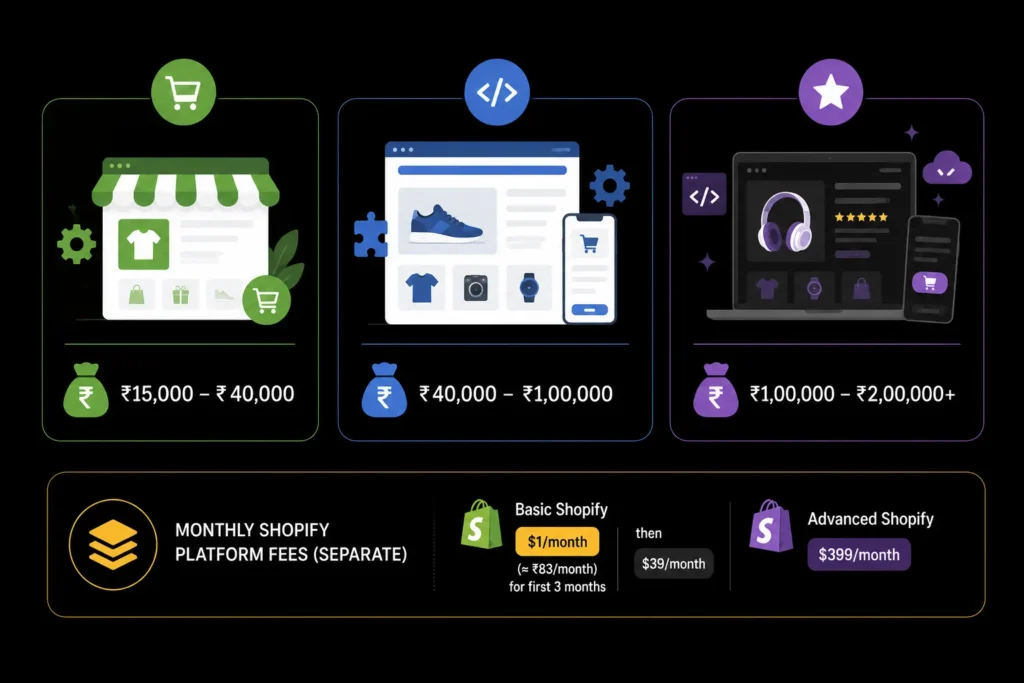
- Basic Shopify store setup: ₹15,000 to ₹40,000 (theme customization, 20 to 50 products, basic configuration)
- Standard Shopify development: ₹40,000 to ₹1,00,000 (custom theme, 50 to 200 products, app integration, SEO setup)
- Custom Shopify development: ₹1,00,000 to ₹2,00,000+ (fully custom design, 200+ products, custom app development, advanced integrations)
Monthly Shopify platform fees are separate: Basic Shopify costs $1/month (approximately ₹83/month) for the first 3 months, then $39/month. Advanced Shopify costs $399/month.
Shopify changes its plan prices and promotional offers from time to time and shows them by country and currency, so check the current figures on Shopify’s pricing page before you budget. Platform fees go to Shopify, not to your developer.
What Makes Shopify Development Quotes Differ?
Two quotes in the same price band can describe very different work. Compare these items line by line:
| Cost driver | Lower cost | Higher cost |
|---|---|---|
| Design | Existing theme with brand colours and fonts | Custom design and bespoke sections |
| Catalogue | Few products, simple variants | Large catalogue, many variants, bundles, metafields |
| Data | Fresh store, products entered manually | Migration of products, customers, orders and redirects |
| Integrations | Standard payment and shipping set-up | ERP, inventory, custom apps, multiple currencies or markets |
| SEO and speed | Basic titles, meta descriptions and image sizes | Structured data, collection architecture, speed tuning |
| Support | Handover only | Retainer for changes and fixes after launch |
Why Choose Shopify Development in India?
India offers the same cost advantage for Shopify development as it does for other digital services. Indian developers charge 40% to 70% less than US, UK, or Australian developers for comparable quality. India also has a large pool of Shopify-certified developers, English proficiency for seamless communication, and experience building stores for both Indian and international clients.
How Do You Choose a Shopify Developer in India?
Choose a developer who shows live stores they built, explains their theme and app decisions, and puts store ownership in your name. Price matters, but a cheap build that is slow, hard to edit or poorly structured for search costs more to fix later. Check these points before you sign:
- Live examples: Open the stores they built on a phone. Check how fast they load, how the product page reads and whether checkout works smoothly.
- Ownership: The Shopify store, domain, payment accounts and theme files should be in your name. Add the developer as a staff or collaborator account instead of sharing your owner login.
- App discipline: Ask how many apps they expect to install. Each app can add scripts and monthly fees. Shopify’s own notes on extending themes with apps describe app blocks and app embeds, and a good developer can tell you which one each app needs.
- SEO awareness: Ask how they will handle collection structure, product titles, canonical URLs and image sizes. If you want it handled together, see our Shopify SEO service.
- Written scope and timeline: The proposal should list pages, features, integrations, revision rounds, and what happens after launch.
- Post-launch support: Find out whether bug fixes are covered for a set period and how change requests are priced.
What Is the Process for Building a Shopify Store?
- Discovery: Confirm products, audience, markets, payment and shipping needs, and the features that must be live on day one.
- Design and theme setup: Pick a base theme, set brand styles and agree page layouts for home, collection, product, cart and key content pages.
- Build and content: Configure the store, add products and collections, connect payments and shipping, and install only the apps you need.
- Testing: Test checkout with each payment method, on mobile and desktop, and check taxes, shipping rates and emails.
- Launch and monitoring: Connect your domain, submit the sitemap in Google Search Console, and watch orders, errors and speed for the first weeks.
How Do You Migrate to Shopify Without Losing SEO?
If you are moving an existing store, the risk is losing the pages that already bring traffic. Before launch, export a list of your current URLs, then map each old URL to its new Shopify equivalent. Shopify lets you create URL redirects, and its URL redirect documentation explains that you can redirect only from URLs that are currently broken, and that you can import many redirects at once from a CSV file in the admin. After launch, check the Page indexing report in Google Search Console for new 404 errors and fix them. For a store redesign or platform move, our website redesign service includes this planning.
What Are the Common Mistakes When Building a Shopify Store?
- Installing too many apps. Extra scripts slow pages. Remove apps you do not use, and check that leftover code is removed from the theme too.
- Uploading oversized images. Large product images hurt load time on mobile.
- Skipping redirects on a migration. Old URLs that lead to errors lose traffic and sales.
- Duplicate or thin product copy. Copying manufacturer descriptions gives search engines little reason to prefer your page.
- Not testing checkout. Test every payment method and a real order before launch.
Build Your Shopify Store in India
Shopify is an excellent platform for e-commerce, and India offers world-class Shopify development at a fraction of Western costs. Whether you are starting a new store or migrating an existing one, the right developer will ensure your store is fast, SEO-friendly, and conversion-optimized. For improving your store’s conversion rate, see our guide to Shopify conversion rate optimization.
MoxSEO offers Shopify development as part of our digital marketing services. Get a free quote to see how we can help you build or migrate your Shopify store.
If you want to compare our scope to this guide, see our Shopify development service. Our packages page publishes starting prices; as of October 2026 Shopify development starts at $1,699 per project, and final fees are confirmed in a written proposal. You can also contact us with your requirements.
Frequently Asked Questions
How much does Shopify website development cost in India?
Shopify website development in India typically costs between ₹15,000 and ₹2,00,000. Basic store setup starts at ₹15,000 to ₹40,000. Standard development with custom theme and app integration costs ₹40,000 to ₹1,00,000. Custom development with fully custom design and advanced integrations costs ₹1,00,000 to ₹2,00,000 or more. Shopify platform fees are separate.
How long does Shopify development take?
A basic Shopify store can be set up in 1 to 2 weeks. A standard store with custom theme, 50 to 200 products, and app integration takes 3 to 6 weeks. A fully custom Shopify store with advanced features and integrations can take 8 to 12 weeks. The timeline depends on the number of products, design complexity, and custom functionality.
Should I use a free or paid Shopify theme?
Free Shopify themes (like Dawn, Sense, and Refresh) are well-designed and sufficient for most new stores. Paid themes ($180 to $400) offer more customization options, advanced features, and unique designs. Start with a free theme if you are launching on a budget, and upgrade to a paid theme once your store is generating revenue.
Can I migrate my existing store to Shopify?
Yes. Shopify offers migration tools for platforms like WooCommerce, Magento, Wix, and BigCommerce. A Shopify developer can handle the migration, including transferring products, customers, orders, and redirects. Migration typically costs ₹30,000 to ₹1,00,000 depending on the size and complexity of your existing store.
Do I need a developer to set up Shopify?
Shopify is designed to be user-friendly, and you can set up a basic store yourself without coding. However, if you need custom theme modifications, app integrations, SEO optimization, or a unique design, a Shopify developer will save you time and ensure professional results. Most businesses benefit from professional development for their store launch.
Who should own the Shopify store and domain?
You should. Create the Shopify account and register the domain in your own name, then add your developer as a staff or collaborator account. That way you keep control of the store, customer data and payment accounts if you change developers.
Do Shopify development quotes include the monthly Shopify fee?
No. Development fees pay for the build. Shopify’s plan fee, paid apps and any paid theme are separate costs. Check the current plan prices on Shopify’s pricing page, which shows them by country.
How do I avoid losing SEO when moving to Shopify?
Map every important old URL to its new page and set up redirects before launch, keep titles and descriptions for pages that already rank, and check Google Search Console for new errors after launch. Shopify lets you import redirects in bulk from a CSV file.
Is a custom Shopify theme worth the extra cost?
Only if your brand or product pages need layouts a customised standard theme cannot provide. Many stores launch well on an existing theme and invest in custom work once sales justify it.

Samruddhi Kadam is an SEO Associate at MoxSEO with 2 years of experience in keyword research, on-page SEO, content optimization, competitor analysis, and website performance tracking. She focuses on improving organic visibility, creating search-friendly content, and identifying practical opportunities to strengthen rankings. Through consistent analysis and data-driven execution, Samruddhi helps businesses attract relevant traffic and build a stronger presence in search results.