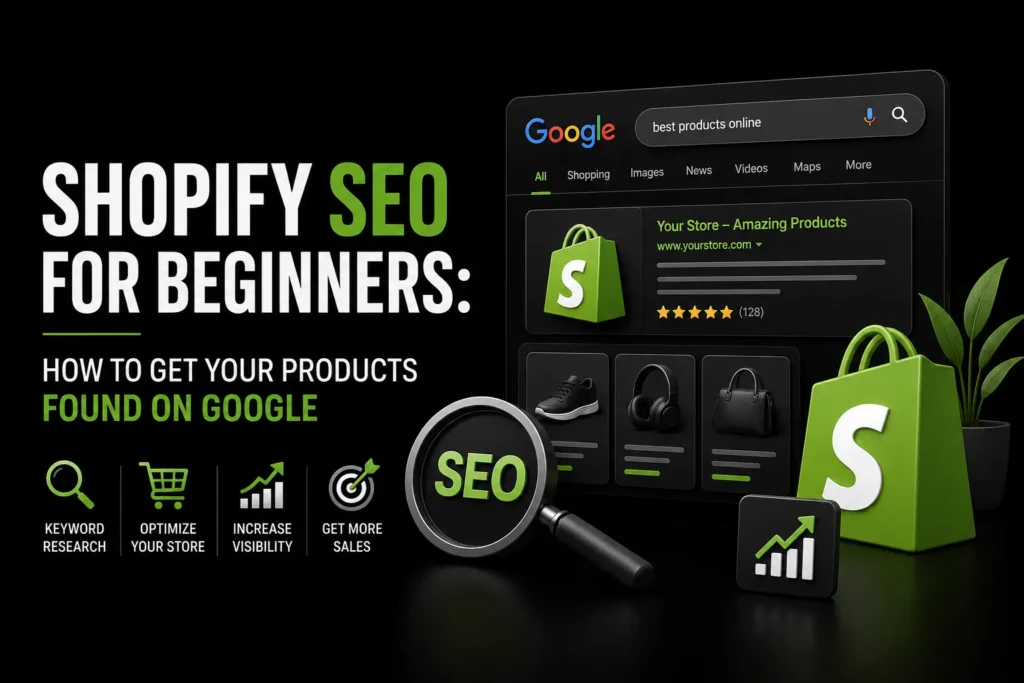
Launching a Shopify SEO for Beginners store is easier than ever, but attracting customers is often the hardest part. Simply adding products to your website does not guarantee that they will appear in Google search results.
Without proper search engine optimization, potential customers may never discover your products unless you continuously spend money on paid advertising. Shopify SEO helps search engines understand your store, index your pages, and show your products to people actively searching for them.
This beginner-friendly guide explains how to improve your Shopify SEO, optimize your product and collection pages, strengthen your website structure, and generate more organic traffic from Google.
TL;DR Shopify SEO helps your product pages, collection pages, and blog posts appear in Google search results. Start by researching relevant keywords, writing unique product titles and descriptions, optimizing collection pages, compressing images, adding descriptive alt text, and improving site speed.
Create a clear internal linking structure, use accurate product schema markup, publish helpful blog content, and manage out-of-stock products correctly. Shopify SEO expert.provides useful built-in SEO features, but store owners must optimize them properly to increase organic traffic and reduce dependence on paid advertising.
What Is Shopify SEO?
Shopify SEO is the process of optimizing a Shopify store so its product pages, collection pages, blog posts, and other important pages can appear in search engine results.
It includes several areas, such as:
- Keyword research
- Product page optimization
- Collection page optimization
- Technical SEO
- Image optimization
- Internal linking
- Structured data
- Website speed
- Content creation
Shopify includes several useful SEO features by default. Store owners can edit title tags, meta descriptions, image alt text, URLs, and page content. Shopify also automatically generates an XML sitemap and applies canonical tags to many pages.
However, these built-in features still need to be used correctly. Many stores struggle to rank because they publish copied descriptions, use unclear product titles, install too many apps, or fail to create useful content.
Shopify SEO Checklist for Beginners
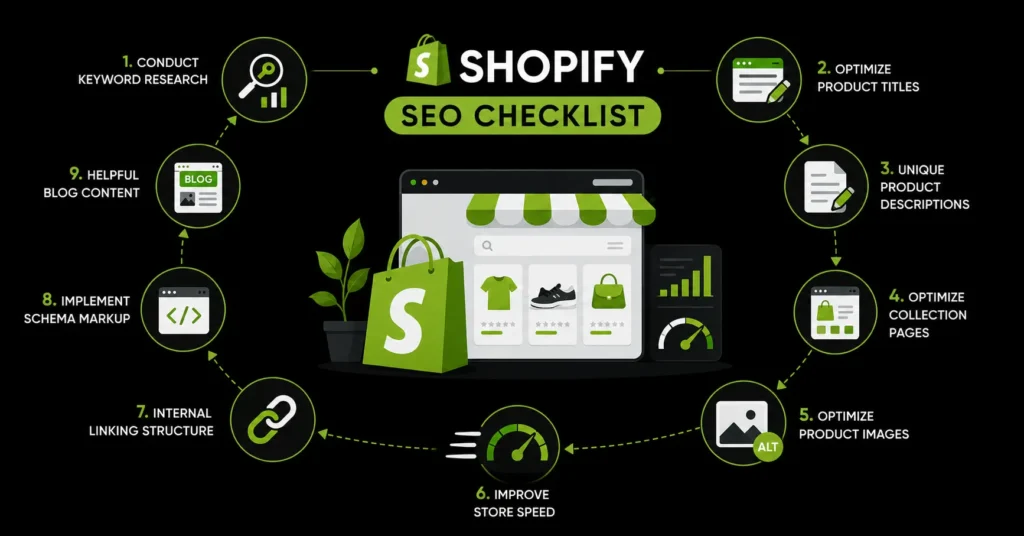
For a successful Shopify SEO strategy, focus on the following areas:
- Conduct keyword research.
- Optimize product titles and descriptions.
- Improve collection pages.
- Optimize product images.
- Improve store speed.
- Create a clear internal linking structure.
- Implement product schema markup.
- Publish helpful blog content.
- manage out-of-stock products correctly.
- Monitor performance and update pages regularly.
Let us examine each step in more detail.
1. Conduct Keyword Research
Keyword research helps you understand what potential customers type into Google when searching for products like yours.
For example, a store selling skincare products should not target only a broad keyword such as “skincare.” More specific keywords may include:
- Moisturizer for dry skin
- Natural face wash for sensitive skin
- Vitamin C serum for beginners
- Oil-free moisturizer for acne-prone skin
Specific keywords usually reveal stronger search intent and can be easier to target than broad, highly competitive terms.
Use your main keywords naturally in product titles, descriptions, collection pages, meta titles, image alt text, and blog content. Avoid repeating the same keyword excessively because keyword stuffing can make your content difficult to read.
The goal is to create content that sounds natural while clearly explaining what the page offers.
2. Optimize Shopify Product Titles
Your product title is one of the most important elements on the page. It tells both shoppers and search engines what the product is.
A good product title should be:
- Clear and descriptive
- Relevant to the product
- Easy to understand
- Based on real search terms
- Different from titles used for similar products
Avoid vague titles such as:
“Classic Collection Item”
A more descriptive title would be:
“Women’s Blue Cotton Oversized T-Shirt”
The improved title includes the product type, audience, colour, material, and style. It provides Google with more context and helps customers understand the product immediately.
Include your primary keyword naturally, but do not make the title unnecessarily long or repetitive.
3. Write Unique Product Descriptions
Copied manufacturer descriptions are one of the most common Shopify SEO mistakes.
The same manufacturer content may appear on hundreds of ecommerce websites. When your product page contains no original information, Google has little reason to rank it above other stores selling the same item.
Write a unique description for every important product. Explain:
- What the product is
- Who it is suitable for
- Its important features
- Its materials or ingredients
- Its size or dimensions
- How it should be used
- What makes it different
- Its main customer benefits
Do not focus only on technical features. Explain how those features help the customer.
For example, instead of writing:
“Made with 100% cotton.”
Write:
“Made with breathable 100% cotton, this T-shirt feels soft against the skin and remains comfortable during everyday wear.”
There is no compulsory word count for product descriptions. However, important products should contain enough original information to answer customer questions and support a buying decision. In many cases, approximately 150 to 300 words may be suitable, depending on the product.
4. Optimize Shopify Collection Pages
Shopify uses collection pages to organize similar products into categories. These pages can target broader commercial keywords and often have greater ranking potential than individual product pages.
Examples of collection keywords include:
- Men’s running shoes
- Organic skincare products
- Women’s summer dresses
- Modern office furniture
- Handmade silver jewellery
Each important collection page should include:
- A unique H1 heading
- A clear introductory description
- An optimized title tag
- A relevant meta description
- Links to suitable products
- Helpful supporting information
Add original content that explains what customers will find in the collection. You can also include buying advice, product differences, materials, sizes, uses, or frequently asked questions.
Avoid adding a large block of text above the products if it pushes the entire product list too far down the page. A short introduction can appear above the products, while detailed supporting content can be placed below them.
5. Optimize Product Images
Product images can improve user experience, conversions, and visibility in Google Images. However, large or poorly optimized images can slow down your Shopify store.
Before uploading an image:
- Compress the file
- Use an appropriate image format
- Choose a descriptive file name
- Add accurate alternative text
- Avoid uploading unnecessarily large dimensions
Instead of using a file name such as:
IMG_1234.jpg
Use:
blue-cotton-oversized-tshirt.jpg
Alt text should briefly explain what appears in the image. It helps search engines understand the visual and supports visitors who use screen readers.
An effective example would be:
“Women’s blue cotton oversized T-shirt front view”
Do not force keywords into every image description. Write alt text for accessibility and accuracy first.
6. Improve Shopify Store Speed
A slow website can frustrate customers, increase bounce rates, and reduce conversions. Performance and Core Web Vitals are also part of the overall page experience considered by Google.
Shopify stores commonly become slow because of:
- Oversized images
- Too many installed apps
- Heavy themes
- Third-party tracking scripts
- Autoplay videos
- Large sliders or animations
- Unnecessary custom code
To improve store speed:
- Remove apps you no longer use.
- Compress product and banner images.
- Choose a lightweight Shopify theme.
- Limit homepage sliders and animations.
- Avoid loading multiple videos automatically.
- Review third-party scripts.
- Test important pages regularly.
Pay special attention to your homepage, collection pages, and best-selling product pages. These pages often receive the most traffic and have the greatest impact on revenue.
A Core Web Vitals audit can help identify layout shifts, slow-loading elements, and interaction delays that require attention.
7. Build a Clear Internal Linking Structure
Internal links connect one page of your Shopify store to another. They help customers discover relevant products and allow search engines to understand how your website is organized.
Useful internal linking opportunities include:
- Linking blog posts to relevant products
- Linking products to their collections
- Linking collection pages to subcollections
- Linking related products to one another
- Linking buying guides to product categories
- Adding breadcrumb navigation
For example, a blog post about choosing running shoes could link to your running shoe collection and several suitable products.
Use descriptive anchor text. Instead of writing “click here,” use text such as “explore our women’s running shoes.”
Internal linking also helps distribute authority throughout your store, reducing the number of important pages that are difficult for search engines to discover.
8. Add Product Schema Markup
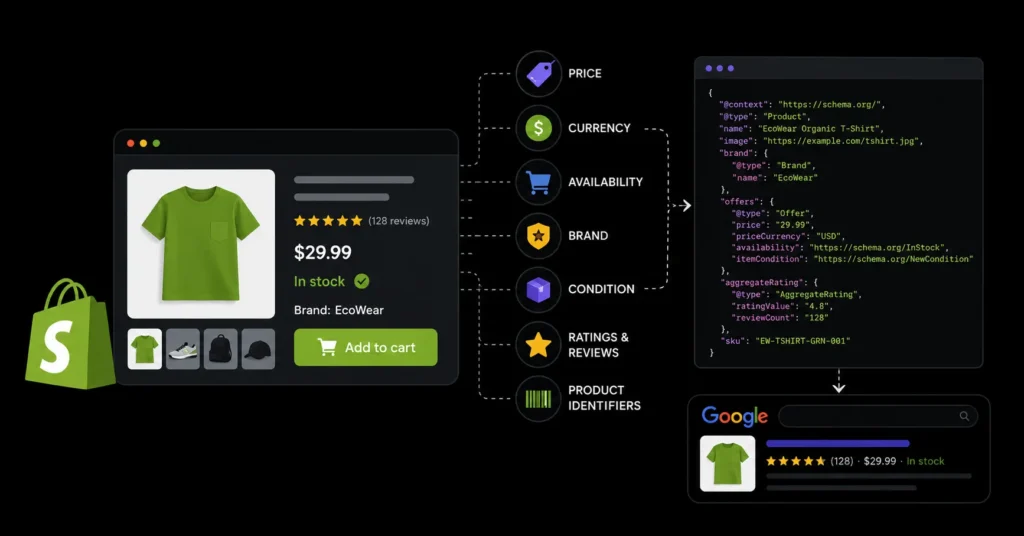
Schema markup is structured data that gives search engines additional information about your pages.
Product structured data can communicate details such as:
- Product name
- Price
- Currency
- Availability
- Brand
- Condition
- Ratings
- Reviews
- Product identifiers
When implemented correctly and when the page meets Google’s requirements, this information may make the search result more informative.
Many Shopify themes include basic product schema, but implementation quality varies. Some stores experience missing fields, duplicate structured data, incorrect availability, or conflicting schema created by multiple apps.
Test your product pages to confirm that the price, availability, ratings, and other information match what visitors can see on the page. Avoid adding ratings or reviews that are not genuinely displayed to customers.
A dedicated schema markup guide can help you review and improve your store’s structured data setup.
9. Create Helpful Shopify Blog Content
Product and collection pages are suitable for commercial searches, but they may not rank for all the questions customers ask before purchasing.
A Shopify blog allows you to target informational searches and attract customers earlier in the buying journey.
Useful ecommerce blog formats include:
- Product buying guides
- How-to articles
- Product comparisons
- Size and measurement guides
- Gift guides
- Care instructions
- Styling tips
- Problem-and-solution articles
- Frequently asked questions
For example, a furniture store could publish articles such as:
- How to Choose an Office Chair for Back Support
- Wooden vs Metal Office Desks
- What Size Desk Is Best for a Small Home Office?
Each article should answer a genuine customer question and link naturally to relevant collections or products.
Avoid publishing thin articles created only to target keywords. Helpful content should provide clear advice, original knowledge, practical examples, or useful product-selection guidance.
10. Handle Out-of-Stock Products Correctly
Deleting every unavailable product page can waste rankings, backlinks, and traffic that the page has already earned.
The correct approach depends on whether the product will return.
Temporarily out of stock
Keep the product page active and clearly display its availability. Where possible, allow customers to request a notification when the item returns.
You can also recommend similar products without removing the original page.
Permanently discontinued
When a product will not return, redirect the URL to the closest suitable replacement. If no direct alternative exists, redirect it to the most relevant collection page.
Avoid redirecting every discontinued product to the homepage. The destination should be closely related to what the customer originally expected to find.
Use a permanent 301 redirect when the old page has been replaced permanently.
11. Optimize Title Tags and Meta Descriptions
Every important product, collection, blog post, and landing page should have a unique title tag and meta description.
A strong title tag should:
- Describe the page accurately
- Include the main keyword naturally
- Match the customer’s search intent
- Remain concise
- Avoid unnecessary keyword repetition
The meta description should summarize the page and encourage qualified users to visit it. Although a meta description is not a direct ranking factor, it can influence how appealing the result appears.
Avoid using the same title and description across multiple pages. Duplicate metadata makes it harder for search engines and users to understand the difference between your pages.
12. Monitor and Improve Your Shopify SEO
SEO is not a one-time task. Products change, competitors publish new content, search behaviour develops, and website issues can appear after theme or app updates.
Regularly review:
- Organic traffic
- Search impressions
- Keyword rankings
- Indexed pages
- Broken links
- Product availability
- Duplicate content
- Page speed
- Conversion rates
- Pages receiving impressions but few clicks
Pages that receive impressions but have a low click-through rate may need better titles and meta descriptions. Pages that receive traffic but generate few sales may require stronger product information, improved images, clearer pricing, or a better user experience.
Start Optimizing Your Shopify Store Today
Shopify SEO does not have to be complicated, but it does require consistent optimization. Begin by improving your product titles, writing unique product descriptions, optimizing collection pages, compressing images, adding descriptive alt text, and improving page speed. Strengthen your internal linking, add accurate product schema markup, publish useful blog content, and manage out-of-stock products correctly.
These essential Shopify SEO practices can help Google understand your store, improve the visibility of your products, and attract customers who are actively searching for what you sell. Over time, a well-optimized store can generate sustainable organic traffic and reduce your dependence on paid advertising.
MoxSEO provides consultation services for new, growing, and established ecommerce stores. Get a free quote today and discover how we can help improve your search rankings, product visibility, and organic sales.
Frequently Asked Questions
Is Shopify good for SEO?
Yes. Shopify includes customizable title tags, meta descriptions, image alt text, canonical tags, redirects, and automatically generated sitemaps. However, store owners must still optimize their content, website structure, speed, and internal links.
How do I optimize Shopify product pages for SEO?
Use a descriptive product title, write an original product description, optimize images, add the product to the correct collection, create relevant internal links, and ensure that product structured data is accurate.
How long does Shopify SEO take?
SEO results depend on the age of the store, competition, website condition, content quality, backlinks, and the number of changes made. Some improvements may become visible within a few weeks, while substantial organic growth often requires several months of consistent work.
Do I need an SEO app for Shopify?
An SEO app is not essential, but it may help identify missing metadata, broken links, image issues, or structured data errors. Avoid installing several apps that provide the same functionality, as this can create conflicts and slow down your store.
What is the biggest Shopify SEO mistake?
One of the biggest mistakes is copying product descriptions from manufacturers or competitors. Original descriptions give search engines more useful information and help customers understand why they should purchase from your store.
Related guides in Shopify SEO
- Shopify SEO: The Complete Guide to Ranking Your Store in 2026
- Shopify SEO Expert: How to Choose the Right One for Your Store
Need this handled for you? Explore our Shopify SEO service.