


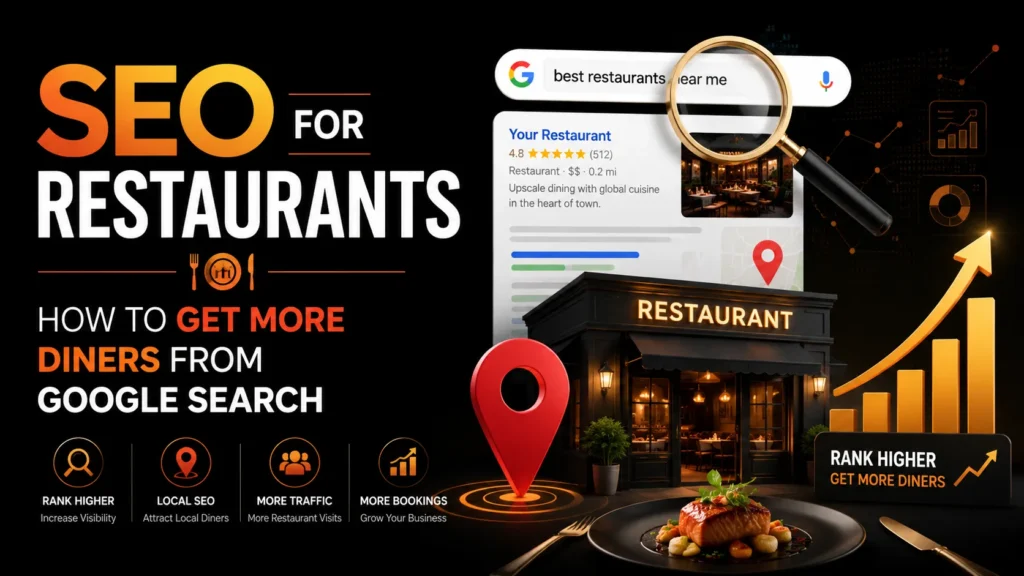
Restaurants face a unique SEO challenge. You are not selling a product that ships nationwide. You are competing for diners within a few kilometers of your location, and those diners are searching on their phones while deciding where to eat tonight. SEO for restaurants is the process of making sure your restaurant appears at the top of Google search results, Google Maps, and the local pack when hungry diners in your area are looking for a place to eat. This guide covers the specific strategies that work for restaurants, bars, and cafes. For a broader look at local search tactics, see our guide on local SEO for businesses.
TL;DR: Restaurant SEO comes down to optimizing your Google Business Profile, building a mobile-fast website with a proper menu, targeting cuisine and location keywords, earning diner reviews, and using schema markup for menus and reservations. Restaurants that do all of these consistently fill more tables from Google searches within 2 to 4 months.
Why Restaurants Need SEO
When people decide where to eat, they search Google. “Best Italian restaurant near me,” “restaurants in Bandra,” “romantic dinner Mumbai,” and “late night food open now” are all searches that happen thousands of times per month in every major city. The restaurants that appear at the top of those searches get the reservations.
Here is what the data shows: 86 percent of diners look up a restaurant on Google before visiting, and the top three results in the local pack capture over 50 percent of clicks. If your restaurant is not showing up for cuisine and location searches in your area, you are losing diners to competitors who are.
SEO also reduces your dependence on food delivery platforms like Zomato and Swiggy, which charge 20 to 30 percent commission on every order. When diners find your website directly through Google, they order directly, and you keep the full margin.
Step 1: Optimize Your Google Business Profile
Your Google Business Profile is the most important SEO asset for a restaurant. It controls your appearance in the local pack, Google Maps, and the knowledge panel that appears when someone searches your restaurant by name. Here is how to optimize it:
Choose the Right Primary Category
Your primary category is the single most important field. Google uses it to determine which searches to show your restaurant for. Choose the most specific category available:
- “Indian Restaurant” rather than just “Restaurant”
- “Italian Restaurant” rather than just “Restaurant”
- “Fine Dining Restaurant” if applicable
- “Cafe” or “Coffee Shop” if that is your primary business
- “Bar and Grill” or “Pub” if applicable
Add secondary categories for additional cuisines or service types (e.g., “Takeout Restaurant,” “Catering Service,” “Bar”).
Complete Every Field
Google uses profile completeness as a ranking signal. Fill out:
- Menu URL: Link to your online menu. Google can display menu items directly in search results.
- Hours of operation: Include exact hours and mark yourself closed on holidays. Inaccurate hours are the number one complaint diners have about restaurant listings.
- Phone number and website: Make sure both are correct and clickable.
- Service options: Mark whether you offer dine-in, takeout, delivery, and outdoor seating.
- Attributes: “Good for groups,” “Romantic,” “Family-friendly,” “Outdoor seating,” “Live music,” “Serves alcohol.”
- Photos: Add high-quality photos of your food, interior, exterior, and team. Restaurants with 100+ photos get significantly more engagement.
Follow Google’s Google Business Profile guidelines to stay compliant and avoid suspension.
Post Updates Regularly
GBP posts let you share updates directly in your search listing. Use them for:
- New menu items and seasonal specials
- Events like live music nights, wine tastings, or holiday menus
- Promotions and offers (e.g., “20 percent off on weekdays”)
- Behind-the-scenes photos of your kitchen and chef
Step 2: Build a Mobile-First Restaurant Website
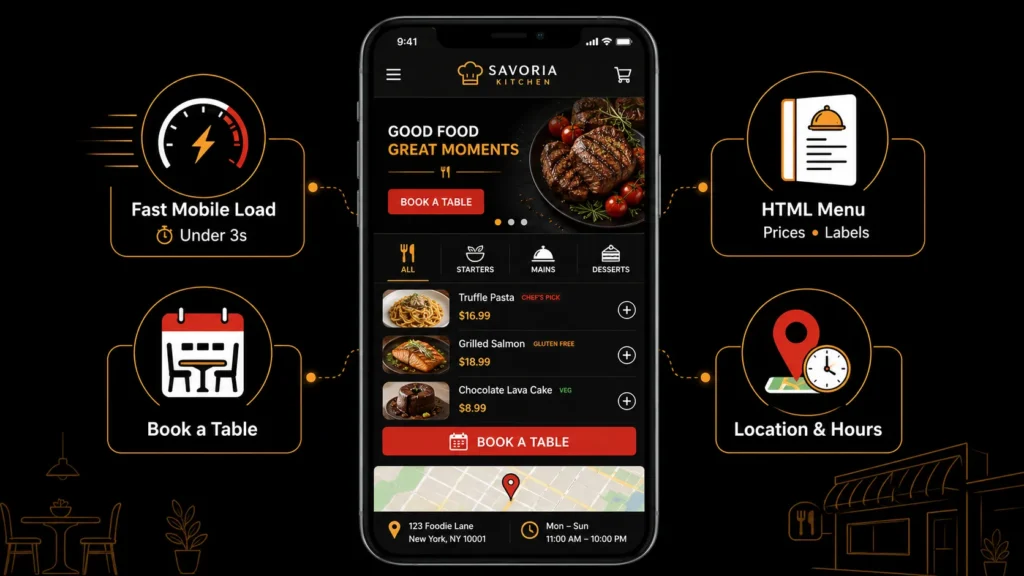
Image Source: AI-generated visual by MoxSEO
Most diners search for restaurants on their phones. If your website is slow, hard to read on mobile, or does not load within 3 seconds, they will leave and go to a competitor. Your website needs to do four things well:
Load Fast on Mobile
Use a fast, mobile-responsive theme. Compress all images. Avoid heavy animations and autoplay videos. Test your site with Google’s PageSpeed Insights and aim for a score above 80 on mobile. Site speed is a confirmed Google ranking factor. For a deeper guide, see our Core Web Vitals guide.
Display Your Menu Properly
Your menu should be on your website as HTML text, not a PDF. Google cannot read text inside a PDF image, which means your menu items will not show up in search results. An HTML menu lets Google index your dishes, so when someone searches “butter chicken in Bandra,” your page can rank for it.
Include prices, descriptions, and dietary labels (vegetarian, vegan, gluten-free, spicy). Organize your menu by category (starters, mains, desserts, drinks) with clear headings.
Make Reservations Easy
Add a prominent “Book a Table” button on every page. Integrate with your reservation system (Dineout, EazyDiner, or your own booking tool). The easier it is to book, the more diners you convert from search traffic.
Show Your Location and Hours
Display your address, hours, and an embedded Google Map on your contact page and in your website footer. This helps both diners and Google understand where you are.
Step 3: Target Restaurant Keywords
Restaurant keyword targeting is different from other industries. You are not trying to rank for “what is Italian food.” You want to rank for the terms diners use when they are ready to eat. These break into four categories:
Cuisine + Location Keywords
These are the highest-intent searches. Each should have a dedicated page or section:
- “Italian restaurant in [city]”
- “Chinese restaurant in [neighborhood]”
- “Best biryani in [city]”
- “South Indian restaurant near me”
Occasion Keywords
Diners often search by occasion. Create content targeting these:
- “Romantic restaurants in [city]”
- “Best restaurants for birthday dinner”
- “Family-friendly restaurants in [area]”
- “Business lunch restaurants [city]”
Feature Keywords
These capture diners looking for specific features:
- “Restaurants with outdoor seating [city]”
- “Late night restaurants open now”
- “Pet-friendly cafes in [city]”
- “Restaurants with live music [area]”
Dish Keywords
If you are known for a specific dish, target it directly:
- “Best pizza in [city]”
- “Where to get authentic ramen in [city]”
- “Best burgers in [neighborhood]”
Step 4: Earn Diner Reviews
Reviews are one of the top local SEO ranking factors, and for restaurants they are everything. Diners read reviews before choosing where to eat, and Google uses review count, rating, and recency as ranking signals.
How to Get More Reviews
- Ask at the table: Train your servers to mention reviews. “If you enjoyed your meal, we would love a review on Google.”
- Add a QR code to the bill folder: Link it directly to your Google review page.
- Send a follow-up email or SMS: If you collect customer contact info for reservations, send a thank-you message with a review link within 24 hours.
- Run a gentle incentive: Offer a free dessert or discount on the next visit for leaving a review. Do not buy reviews or offer cash for reviews, as this violates Google’s policies.
How to Respond to Reviews
Respond to every review. For positive reviews, thank the diner and mention what they ordered. For negative reviews, apologize sincerely, address the specific complaint, and invite the diner back for a better experience. Professional responses to negative reviews show potential diners that you care. Follow Google’s review response guidelines for best practices.
Step 5: Use Restaurant Schema Markup
Structured data helps Google understand your restaurant and display rich results in search. Add Restaurant schema to your website with:
- Restaurant name, description, and cuisine type
- Address, phone number, and hours
- Price range (e.g., “Rs. 500-1500 per person”)
- Menu URL
- Reservation URL
- Aggregate rating (from your reviews)
- Serves cuisine type
You can also add Menu schema to your menu page, which lets Google display menu items directly in search results. See our schema markup guide for implementation details.
Step 6: Build Local Citations and Backlinks
Citations are mentions of your restaurant name, address, and phone number on other websites. Consistent NAP across directories helps Google verify your information. List your restaurant on:
- Zomato and Swiggy (keep your listing updated even if you want direct orders)
- Dineout and EazyDiner
- Justdial and Sulekha
- TripAdvisor (if you get tourist traffic)
- Google Maps, Apple Maps, Bing Places
- Local food blogs and restaurant review sites
For backlinks, reach out to local food bloggers and influencers for reviews. Get featured in “best restaurants in [city]” lists. Sponsor local food festivals and community events. For a complete link building strategy, see our link building strategies guide.
Step 7: Create Content That Attracts Diners
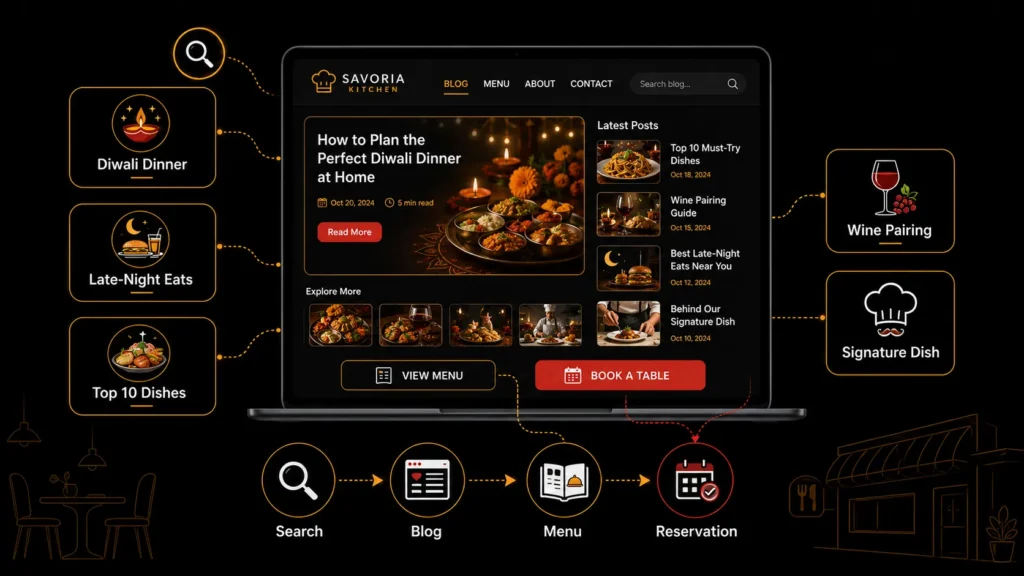
Image Source: AI-generated visual by MoxSEO
A restaurant blog can capture intent and occasion keywords that your main pages cannot. Write content that diners search for:
- “Best restaurants for Diwali dinner in [city]”
- “Where to eat late night in [neighborhood]”
- “Top 10 dishes to try at [your cuisine] restaurant”
- “How to choose the right wine for your meal”
- “Behind the scenes: how we make our signature dish”
Each post should link back to your menu and reservation page, creating a path from research to booking. Follow Google’s helpful content guidelines to ensure your content provides genuine value.
Common Restaurant SEO Mistakes to Avoid
- PDF menu instead of HTML: Google cannot index text inside a PDF image. Your menu must be HTML text on your website.
- Inaccurate hours: Diners who arrive at a closed restaurant leave a negative review and never come back. Keep your hours updated everywhere.
- No Google Business Profile photos: Restaurants with no food photos get skipped. Add high-quality photos of your most popular dishes.
- Ignoring reviews: Not responding to reviews signals that you do not care. Respond to every review, positive and negative.
- Slow mobile website: If your site takes more than 3 seconds to load on mobile, diners leave. Speed is a ranking factor and a conversion factor.
Grow Your Reservations with SEO for Restaurants
SEO for restaurants is not only about achieving higher Google rankings. It is about helping nearby diners discover your restaurant at the exact moment they are searching for a place to eat, order food or book a table.
An optimized Google Business Profile, mobile-friendly website, searchable HTML menu, genuine customer reviews and location-focused content can turn Google Search and Maps into consistent sources of reservations, calls, direction requests and direct orders.
However, restaurant search results are competitive, and small issues such as incorrect business information, slow page speed, weak location targeting or an outdated menu can push potential diners toward competitors.
MoxSEO helps restaurants, cafes and bars build practical local SEO strategies focused on visibility, customer actions and measurable growth. We analyse your Google Business Profile, website, menu pages, local rankings, reviews and competitors to identify the opportunities that can bring more diners to your business.
Ready to attract more diners through Google? Get a free SEO for restaurants consultation with MoxSEO and discover what is limiting your local visibility.
Frequently Asked Questions
How long does SEO take for restaurants?
Most restaurants see initial ranking improvements within 4 to 8 weeks of optimizing their Google Business Profile and website. Reaching the top 3 of the local pack in a competitive market typically takes 2 to 4 months. Restaurants in less competitive areas or with strong existing profiles can see results faster.
What is the most important SEO factor for restaurants?
Your Google Business Profile is the most important factor, specifically your primary category, profile completeness, photos, and review count. After that, a mobile-fast website with an HTML menu and proper schema markup is the most impactful for organic rankings.
Should I still list my restaurant on Zomato and Swiggy?
Yes. Food delivery platforms are also search engines where diners discover restaurants. Keep your listings updated with accurate menus, photos, and hours. However, your goal with SEO is to capture diners who search Google directly, so they can order from your website or visit in person without the platform commission.
How do I rank for u0022best restaurant in [city]u0022?
Ranking for u0022best restaurantu0022 searches requires a combination of strong reviews, local press coverage and backlinks, content targeting the keyword, and a well-optimized Google Business Profile. Getting featured in local u0022best ofu0022 lists and food blogs is particularly powerful for these queries.
Can I do restaurant SEO myself?
You can handle the basics: completing your Google Business Profile, asking diners for reviews, and putting your menu online as HTML text. Technical SEO, schema markup, and competitive keyword targeting usually require professional help. If you want to manage SEO in-house, start with our u003ca href=u0022/on-page-seo-guide/u0022u003eon-page SEO guideu003c/au003e.
Related guides in Industry SEO
- SEO for SaaS Companies: A Complete Guide to SaaS SEO
- SaaS SEO Consultant: How to Choose the Right One
- SEO for Dentists: How to Get More Dental Patients from Google
- SEO for Doctors: How Healthcare Providers Can Attract More Patients
- SEO for Hotels: How to Increase Direct Bookings from Search
Need this handled for you? Explore our SEO Services service.

Sakshi Kumari is an SEO Specialist at MoxSEO with expertise in keyword research, on-page SEO, content optimization, technical SEO, and link-building strategies. She focuses on improving organic visibility, strengthening website performance, and creating search-focused content that attracts relevant traffic. Through data-driven analysis and practical SEO execution, Sakshi helps businesses build stronger search presence and achieve sustainable digital growth.