






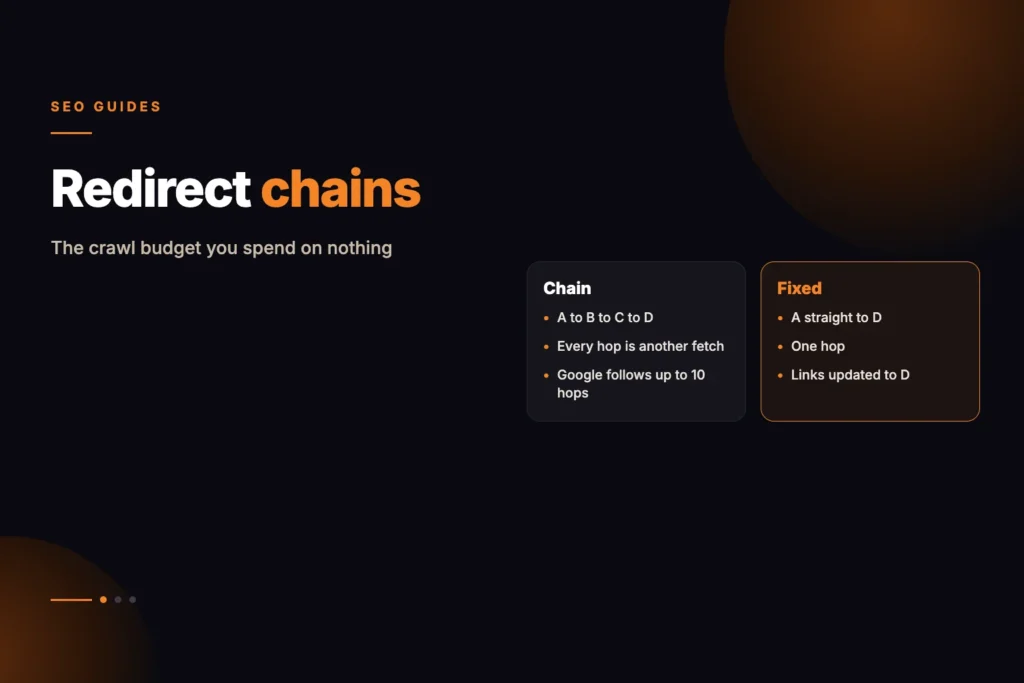
A single redirect costs almost nothing. Thousands of them, encountered on every crawl, create a tax you pay on discovery forever. Redirect chains waste crawl budget, slow page access, and force search engines to spend resources on unnecessary hops. They are one of the few technical SEO problems where the fix is genuinely simple, but continued neglect can become expensive.
Short answer: a redirect chain is a URL that sends visitors through two or more redirects before reaching the final page. Fix it by pointing the first URL, and every internal link, straight at the final URL. Keep the old redirects that still receive traffic or links, but make each one a single hop. Googlebot generally follows up to 10 hops, yet long chains still hurt crawling and speed.
What a chain actually is
A chain is more than one hop between the URL requested and the URL served. Request A, get sent to B, which sends you to C, which finally returns the page.
Each hop is a separate request. Each costs time for the visitor and a fetch for the crawler. Google follows a limited number of hops before giving up entirely.
Chains accumulate quietly. A site migrates HTTP to HTTPS, later adds trailing slashes, later restructures a section. Each change adds a rule, and rules layer rather than replace.
When we consolidated eleven cannibalising posts on this site, the redirects themselves took minutes. Repointing the internal links so nothing routed through them took considerably longer, and it is the step that actually matters — 33 links across 32 pages had to be rewritten to reference the destination directly.
How Many Redirects Will Google Follow?
Google’s documentation on HTTP status codes and network errors says Googlebot generally follows 10 redirect hops when crawling general web content, then processes the content at the final target URL. Its Inspection Tools do not follow redirects at all. That ceiling is a safety limit, not a target. Google’s crawl budget guide separately advises to “avoid long redirect chains, which have a negative effect on crawling”, so the goal remains one hop.
Where the cost actually lands
Not usually in rankings for a single page. The cost is spread and therefore easy to ignore.
- Crawl budget spent on hops rather than pages, which matters most on large sites
- Page speed, since every hop is a full round trip before anything renders
- Signal dilution across long chains, though modern handling is better than it was
- Broken loops, where a chain eventually points back at itself and the page becomes unreachable
Does My Site Need to Worry About Crawl Budget?
Be honest about scale. Google’s crawl budget guide says it is aimed at large sites with 1 million or more unique pages whose content changes about weekly, medium or larger sites with 10,000 or more pages that change daily, and sites where a large share of URLs are reported in Search Console as “Discovered – currently not indexed”. It adds that these are not exact thresholds, and that other sites generally do not need the guide.
For a smaller site, chains are less about crawl budget and more about speed, clean signals and avoiding loops. They are still worth fixing because the fix is cheap, but do not expect a ranking jump from it.
Find them, then fix the source
Our on-page audit tool follows up to five hops and lists each one, so you can see the full path rather than just the destination.
The fix is always the same: update the link to point at the final URL. Not the redirect rule — the link itself.
Rewriting internal links is the part most people skip, and it is the part that matters. A redirect exists to catch external links and old bookmarks. Your own site should never need it.
How Do I Fix a Redirect Chain Step by Step?
- Crawl the site and export every URL that returns a 3xx status, with its final destination.
- Sort by hops. Anything with two or more hops is a chain. Loops, where a URL ends up back at itself, come first because those pages are unreachable.
- Check where each chain starts. Is the first URL linked from your own pages, menus or sitemap, or only from outside? Internal sources are fixed by editing links; external sources are fixed by flattening the rule.
- Flatten the rules. Make A point directly to C. Leave B pointing to C.
- Rewrite internal links, canonicals and sitemap entries so they use the final URL.
- Re-crawl to confirm that every old URL now reaches its target in one hop with the right status code.
A hypothetical example: a shop moved to HTTPS years ago, then dropped “www”, then renamed a category. A very old link, http://www.example.com/shoes/, now goes to https://www.example.com/shoes/, then to https://example.com/shoes/, then to https://example.com/footwear/. Three hops. One rule sending the original straight to the final address solves it, and updating the menu link means most visitors never use the redirect at all.
Which Redirects to Keep
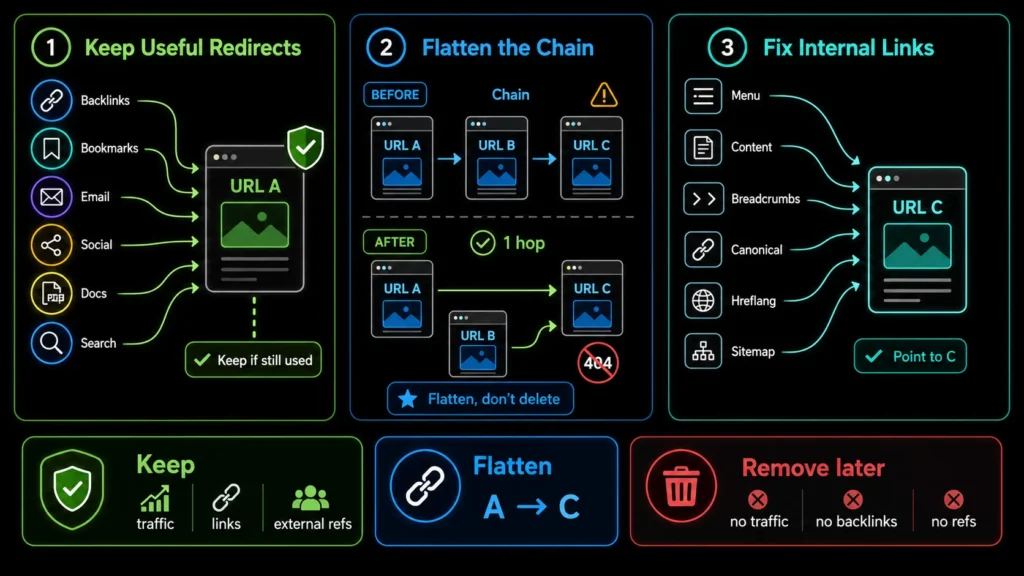
Do not remove old redirects simply to make a redirect report look cleaner. An old URL may still receive visitors through backlinks, saved bookmarks, email campaigns, social posts, downloadable documents, or previously indexed search results. If the redirect is deleted while those references still exist, the old URL will return a 404 error, creating a poor user experience and potentially wasting the authority earned through external links.
The better solution is to flatten the redirect path. If URL A redirects to URL B and URL B redirects to URL C, update the rule for URL A so that it points directly to URL C. The redirect from B to C can remain for users and crawlers that request B directly, but anyone requesting A reaches the final destination in a single hop. This preserves the value of both old URLs without maintaining an unnecessary chain.
You should also update every internal link that still points to A or B so it references C directly. Redirect rules are safety nets for outdated external references; they should not be part of your website’s normal navigation. A comprehensive SEO audit can identify redirect chains hidden within content links, menus, breadcrumbs, canonical tags, hreflang annotations, and XML sitemaps.
Permanent redirects are inexpensive to retain but potentially costly to remove too early. Keep redirects that continue to serve a valid purpose, flatten any chains they create, and correct the internal links that trigger them. Consider removing a redirect only after confirming that the old URL no longer receives meaningful traffic, has no valuable backlinks, and is not referenced by important external sources.
Finding chains across a whole site
Checking one URL tells you about one URL. The pattern is what matters, and there are three places it usually hides.
- Internal links in content — old URLs written into posts years ago and never updated
- Navigation and footers — a single stale menu link multiplied across every page
- Sitemaps — listing URLs that redirect, which asks Google to crawl a hop
The navigation case is the highest-leverage fix on most sites. One link in a menu that appears on 500 pages is 500 redirect hops per crawl, fixed by editing one thing.
Our free internal link finder can help you see which pages link where, which makes stale links easier to trace to their source.
Redirect types, and when each is right
The status code carries meaning. Using the wrong one is a common and quietly expensive mistake.
- 301 — permanent. The correct default for a page that has moved for good.
- 302 — temporary. Signals that the original will return, so consolidation is treated differently.
- 307 — temporary, method-preserving. Rarely relevant to content pages.
- Meta refresh — Google treats an instant refresh (0 seconds) as a permanent redirect and a delayed one as temporary, but it is slower and less dependable than a server-side redirect. Avoid it.
- JavaScript redirect — works, but only after rendering. Slower and less reliable.
A 302 left in place for years is one of the more common findings on older sites. It usually started as a genuine temporary move and nobody went back.
Per Google’s Redirects and Google Search documentation, Googlebot follows both permanent redirects (301, 308) and temporary ones (302, 303, 307). With a permanent redirect the indexing pipeline treats the target as the canonical; with a temporary one the redirect is not used as a canonical signal, so the source page may remain in results. Use a permanent redirect only when you are sure it will not be reverted.
The migration checklist that prevents this
Chains are overwhelmingly created during migrations, and almost entirely preventable with one discipline: map every URL before launch, not after.
- Export every indexable URL from the current site before anything changes
- Map each to its destination on the new structure, one to one where possible
- Point every rule at the final destination, never at another redirect
- Update internal links, navigation and sitemaps to the new URLs directly
- Test the full map before go-live, not after traffic drops
When we consolidated eleven posts on this site, that last step is what caught a rule pointing at a URL which itself redirected. Testing before launch turned a live problem into a five-minute correction.
If you are planning a redesign or platform change, build the redirect map into the project from the start. Our website redesign work includes this planning, and you can see how we approach technical checks on our methodology page.
Stop Wasting Crawl Budget on Redirect Chains
Redirect chains may appear harmless individually, but across a large website they can waste crawl resources, slow page access, and delay the discovery of important URLs. MoxSEO can review your redirect paths, internal links, navigation, canonicals, and XML sitemaps to identify unnecessary hops and redirect loops.
You can request a free technical SEO audit to uncover redirect chains and other crawlability issues across your website. If you are planning a migration or need a safe redirect-cleanup strategy, schedule an SEO consultation for recommendations based on your current URL structure.
Sources and further reading
- Redirects and Google Search
- Crawl budget management for large sites
- HTTP status codes, and network and DNS errors
Frequently asked questions
How many redirects will Google follow?
Googlebot generally follows up to 10 redirect hops when crawling general web content, according to Google’s documentation, and then processes the final target URL. That is a ceiling, not a goal. Long chains still slow crawling and visitors, so one hop is the sensible target.
Do 301 and 302 differ for chains?
A 302 signals a temporary move and consolidates differently. Chains of either are worth flattening; use 301 for permanent moves.
Should I ever remove an old redirect?
Only when you are confident nothing external still points at the old URL, and even then the rule costs almost nothing to keep.
Do redirect chains hurt page speed?
Yes. Each hop is a full round trip before rendering begins, which is most noticeable on mobile connections.
What is the difference between a redirect chain and a redirect loop?
A chain eventually reaches a final page after several hops. A loop sends the request back to a URL it has already visited, so it never ends and the page cannot be reached. Loops should be fixed first.
Do redirect chains matter for a small website?
Less for crawl budget, which Google says matters mainly for very large or fast-changing sites. They still add delay for visitors and can hide mistakes, so flatten them when you find them, but do not expect a ranking jump from doing so.
Where do redirect chains most often come from?
Migrations and stacked rules: HTTP to HTTPS, www to non-www, trailing slashes, and renamed sections, each added at a different time. Old internal links, menus and sitemap entries then keep sending visitors into the start of the chain.
How do I check whether a URL has a redirect chain?
Use a crawler or a tool that lists every hop, such as the on-page audit tool, and look for any URL with more than one redirect before the final page. Also check the final status code, which should be 200.