






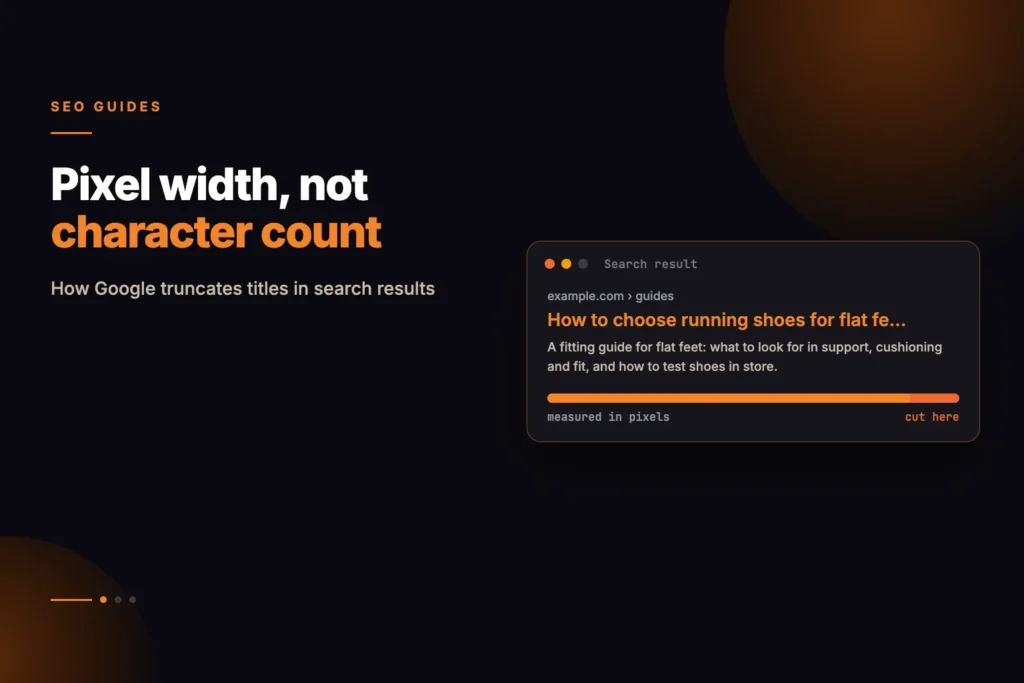
Almost every piece of advice about title tags is based on character count: keep them under 60 characters. However, Google does not count characters; it measures title tag pixel width. The difference is significant enough that a 55-character title can be truncated while a 70-character title may appear in full.
Short answer: Google truncates a title when it is wider than the space available in the results, measured in pixels, not characters. On desktop the working limit is roughly 580 pixels (as of October 2026, and Google can change it). Capital letters and wide characters use more of that space, so a shorter title can be cut while a longer one in lower case is not.
Why characters are the wrong unit
Search results are rendered in a proportional typeface. An i occupies a fraction of the space of a W. A title in capitals is dramatically wider than the same title in sentence case.
Two titles, both 58 characters:
- AFFORDABLE PLUMBING SERVICES IN CENTRAL LONDON AREA TODAY — roughly 640px, cut
- Affordable plumbing services in central London area today — roughly 490px, intact
Same character count. Completely different outcome. Any guidance expressed in characters is approximating something it cannot see.
Running our own service pages through the measurement, titles clustered between 380 and 500 pixels against a 580 pixel threshold — comfortable, but only because most of them avoid capitals. The one page that used them sat close enough to the limit that a two-word addition would have pushed it over.
The numbers that actually matter
Desktop results truncate titles at roughly 580 pixels and meta descriptions at roughly 990 pixels. Mobile differs and Google adjusts both periodically, so treat these as working thresholds rather than constants.
Our on-page audit tool measures both in pixels and reports the width alongside the character count, so you can see which of the two is actually constraining you.
Being under the threshold is not the goal in itself. The goal is that the part which carries meaning survives.
How Do You Check a Title’s Pixel Width?
- Collect the titles. Export them from a crawl, your CMS or the audit tool, one row per page.
- Measure each one in pixels with the on-page audit, which reports width next to character count.
- Flag the risky ones. Anything above about 560 pixels is close to the threshold; anything above 580 is likely to be cut on desktop.
- Read the cut version. Trim each flagged title at roughly 580 pixels and ask whether the visible part still says what the page is.
- Rewrite from the front. Move the distinguishing words forward, remove padding words and move the brand to the end.
- Check the live result. Search for the page, or use Search Console, to see what Google actually displays, since it may substitute its own title.
- Repeat for pages that matter first, such as those with the most impressions and the lowest click-through rate.
Write for the truncation, not against it
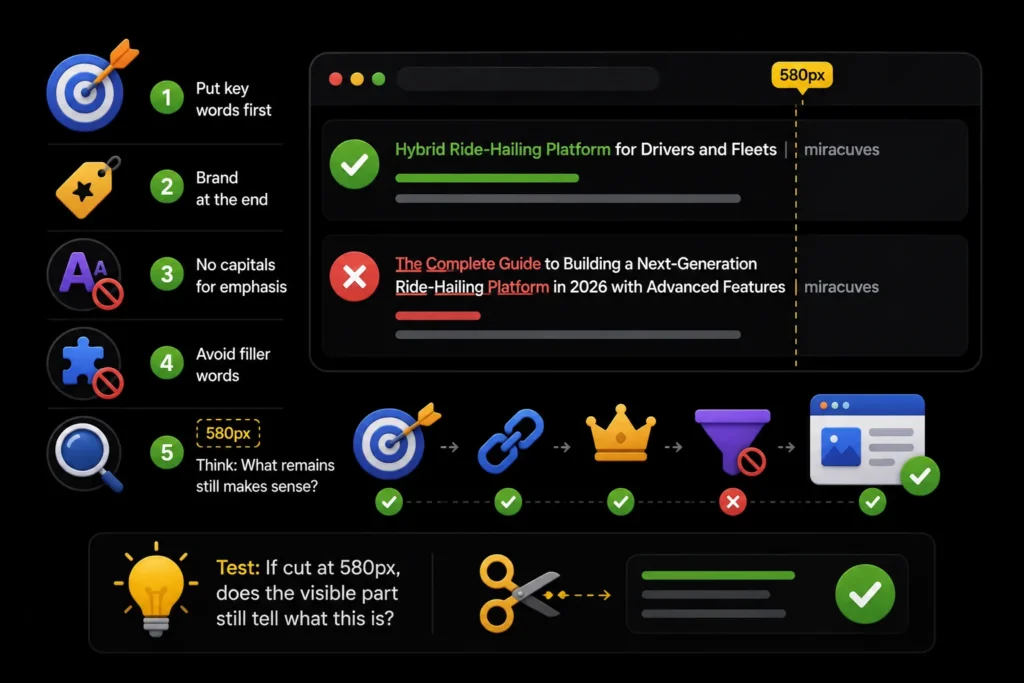
Truncation is not a failure state. A long title that reads well and cuts cleanly is better than a short one that says nothing.
- Put the distinguishing words first, since the front of the title always survives
- Keep the brand at the end, where losing it costs least
- Avoid capitals for emphasis, which buys width and gains nothing
- Do not pad with connecting words that add no meaning
The test worth applying: if the title were cut at 580px, would the visible half still tell someone what this page is?
Google may rewrite it anyway
A significant share of titles shown in results are not the ones the page declared. Google substitutes when it judges the title unhelpful for the query, over-optimised, or poorly matched to the content.
You cannot prevent this, and treating it as a fault is a mistake. A rewritten title usually means Google found something on the page it considered more relevant.
What you can do is make the declared title the obvious best choice: accurate, specific to the page, and not stuffed. Rewrites become rarer as titles become more honest.
Google’s documentation on title links says it uses several sources, including the title element and the main visible heading, to create the title link shown in results. That is a reason to keep the title tag, the H1 and the page content consistent with each other.
How Do the Title Tag and H1 Differ?
| Element | Where it appears | Constraint | Job |
|---|---|---|---|
| Title tag | Search results, browser tab, shared links | Width in pixels in results | Tell searchers what the page is and earn the click |
| H1 | Top of the page itself | No truncation, but should be readable at a glance | Confirm to the visitor they are in the right place |
They can be similar but need not be identical. A title can be compact for the results page while the H1 is fuller and more natural for reading.
Meta descriptions follow the same rule
Everything true of titles applies to descriptions, with a wider budget. Desktop truncation begins around 990 pixels, which is roughly 155 to 165 characters in ordinary sentence case and considerably fewer in capitals.
Descriptions are not a ranking factor, which leads people to neglect them. They are a click-through factor, and click-through is the part you can actually influence from the results page.
- Answer the query in the first clause, before any truncation risk
- Include the specific detail that differentiates you — a number, a constraint, a price
- Avoid restating the title, which wastes the only second chance you get
- Write one per page. Duplicated descriptions across a site are a wasted asset.
Google may also replace your description with a passage from the page that better matches the query; its guide to controlling snippets explains how snippets are chosen. Draft yours with the meta tag generator and verify the width afterwards.
Mobile behaves differently, and mobile is most of your traffic
Mobile results allow more lines but a narrower column, so wrapping matters more than total width. A title that survives on desktop may wrap awkwardly on a phone and lose its emphasis.
Google uses the mobile version of a page for indexing and ranking, and most searches happen on phones, so check how your titles look on mobile as well as desktop. Checking only on a desktop screen is checking the less important case.
The practical approach is to keep the distinguishing words inside the first forty characters. That survives every breakpoint, every device and any future adjustment Google makes to the thresholds.
A worked example
Take a page about emergency plumbing in Leeds. Three candidate titles, all defensible:
- Emergency Plumber Leeds | 24/7 Callout | Gas Safe Registered | YourCo — roughly 620px, cut mid-phrase
- Emergency Plumber in Leeds — 24/7 Gas Safe Callout | YourCo — roughly 510px, intact
- Leeds Emergency Plumbing Services Available Twenty-Four Hours — roughly 540px, intact but vaguer
The second is the strongest, not because it is shortest, but because everything that differentiates the business survives truncation and the brand sits where losing it costs least.
Run your own through our on-page audit and compare the pixel figure against the character count. The pages where the two disagree most are the ones worth rewriting.
Common Title Tag Mistakes and How to Fix Them
| Mistake | How to spot it | Fix |
|---|---|---|
| Capitals for emphasis | Pixel width far above what the character count suggests | Use sentence or title case |
| Brand first on every page | The key words fall after the cut | Move the brand to the end |
| Same title across many pages | Duplicate titles in a crawl | Write a distinct title for each page’s main topic |
| Keyword list instead of a phrase | Reads as a string of terms separated by pipes | Write one natural phrase that names the page |
| Title promises something the page lacks | High impressions, low clicks, or Google rewrites it | Match the title to the content, or improve the content |
If you have many pages to review, our SEO services include on-page work at scale. This guide is reviewed by Ashish Khan and Sakshi Kumari, SEO specialists at MoxSEO. For choosing which phrase leads a title, start with the keyword research tool.
Sources and further reading
Frequently asked questions
What is the safe title length in characters?
Around 45 to 60 as a rough guide, but measure the pixel width if the title uses capitals, numbers or wide letters.
Does the title tag still affect rankings?
It is a relevance signal, though a weaker one than it once was. It matters far more for click-through, which is where the real gain sits.
Should the brand name go in every title?
On most pages yes, at the end. On a page competing for a high-intent query, the space may be better spent on the query itself.
Why does Google show a different title than mine?
It judged yours less helpful for that query. Check whether your title matches what the page actually delivers, then make it more specific.
What is the pixel limit for a title tag?
Roughly 580 pixels on desktop and roughly 990 pixels for a meta description, as of October 2026. Google adjusts these over time, so use them as working limits and check how your pages appear.
Do emojis and special characters change the width?
Yes. Symbols, numbers and capital letters can be wider than lower-case letters, and some display differently across devices. Measure the real title instead of counting characters.
Is a truncated title bad for SEO?
Not in itself. Truncation changes what searchers see, not how Google understands the page. The risk is that the cut hides the words that explain the page, which can reduce clicks.
How often should I check my titles?
Review the pages with the most impressions after any template or CMS change, and then once or twice a year. Search Console shows which pages have low click-through for their position.
Does the H1 need to match the title tag?
No. They should agree about the topic, but the H1 does not have to be identical, and it is not limited by results-page width.